Nov 11 2022

What’s the Deal With Mastodon Instances?

an ai-generated image of a cartoon mastodon using a laptop
In light of Elon Musk opting to go a different path from my recommendations, Twitter is managing to fall into a state of chaos at a rate that’s frankly impressive.

A lot of Twitter users are jumping ship to Mastodon. It’s familiar to Twitter users. You write short posts (we call them toots) and you follow people. But structurally, the network and moderation models are very different.

Mastodon Does Things a Little Differently

If you want to join Twitter you get an account on Twitter itself. If you want to join Mastodon there is no one Mastodon; there are many instances of Mastodon.

That’s not as unfamiliar as you might think. If you want an email address there isn’t a single company you get an account with; instead there are lots of email providers. And no matter which email provider you pick, you can email anyone else with an email address, and they can email you. Mastodon is kind of like that too.

Picking an Instance

So, the short story is that you can sign up on any instance you want and you’ll be on Mastodon.

If you go to joinmastodon.org they have a directory of instances you can browse, and you can pick a general-purpose instance and you’ll probably be fine.

Mastodon instances are run by volunteers who aren’t paid, and the people who run them have to pay server bills. I recommend that you kick them a few bucks every month to help with the expenses (if they seek donations).

Hell, if you wanted to you could even host your own instance, just like you can host your own email server. It’s well-documented and there’s even Mastodon hosting as a service.

Timelines

There are three different main timelines on Mastodon: your home timeline, the local timeline, and the federated timeline.

The home timeline works like classic Twitter. It’s a reverse chronological timeline of toots from people you are following. That’s one characteristic of Mastodon that helps make it less toxic; you aren’t being pushed content by some algorithm; you are in control of who you see toots from.

The local timeline is a timeline of all the toots from all the people on your Mastodon instance. If you joined an instance centered around a particular community or interest, this might be useful to you. If you’re on a more general-purpose instance like mastodon.social, this will feel more like a firehose of toots.

Mastodon instances can choose to federate with each other as well. When your instance federates with another instance, your federated timeline will include toots from your own instance, and all the other instances yours federates with. If, for example, you’re a member of an instance for people interested in retro gaming in Portland, your instance might federate with other instances that are centered around retro gaming.

Federation doesn’t affect who you can follow and who can follow you, though!

One Account? Or Many?

I initially made an account on mastodon.social because I just wanted to get my feet wet with Mastodon and my way of thinking about it worked was similar to how I thought Twitter worked.

But I do have more than one account now, and my secondary accounts are in smaller communities centered around specific things.

One of the things I always liked about Twitter was that when I followed people I primarily followed them because of a single shared interest but over time I’d get to learn more about some of their other interests. So with that in mind I don’t think you should compartmentalize your personality into different accounts, but if there’s a particular topic you want to get really deep about, it might make sense to join an instance focused on that specific thing. And you can always boost (equivalent of retweeting) your toots from specific instances if you want to share it with your more general audience.

Moderation

One of Twitter’s major points of weakness has been moderation, and moderating Twitter has been difficult in part because there is only one Twitter for the entire world to use.

An ideal Mastodon ecosystem consists of a large number of instances, each of which has a small number of users. These instances get to set their own rules for what is acceptable and what isn’t, and by not having too many people, it’s not too burdensome to moderate.

I like Mastodon because most of the instances don’t tolerate far-right bullshit and racism and that kind of thing.

And if someone comes along and does make an instance that does tolerate that (and it happens), instance admins can completely block the entire instance in one fell swoop.

In practice this works pretty well, and it does a good job of accommodating differences in values. Whereas big singleton social networks like Facebook and Tumblr are not friendly to nudity and sexually explicit material, there are lots of Mastodon instances that are just fine with it, and you can have an account on there without worrying constantly about moderators (and people on a stricter instance can still follow you, if they choose to). This more closely resembles how human networks work, where different groups have different social norms.

Moving Instances

an image from Arrested Development where Michael Bluth proclaims he is out of this family

You know all the times that Twitter pissed you off and you said “okay, I’m done with Twitter” and then you were back next week because all the people you knew were on Twitter still and didn’t follow you elsewhere?

On Mastodon, you can move instances with relative ease. Not all your data moves perfectly right now, but you can move frictionlessly to a new instance without losing your social graph.

So pick an instance and don’t overthink it! It’s not a permanent decision.

Nov 2 2022

The Freestyle Libre 3 Puts the “Continuous” in “Continuous Glucose Monitor”

Having diabetes is no fun, but from early on my favorite coping mechanism has been to try to combine managing my diabetes with my affinity for technology and cool new tools and gadgets.

When I had my first appointment with my first endocrinologist, I thought I was ahead of the curve when I said I had ordered a snazzy finger stick blood glucose monitor that had a companion iOS app. She immediately responded “no, I’m going to give you something better,” and she handed me a prescription for a system called FreeStyle Libre.

And it was indeed better than fingersticks. Instead of pricking your finger many times a day and getting a single number, you could, at the time, prick yourself once with a sensor applicator that stuck a sensor on your arm with a little filament that went just beneath the skin (it sounds scary and the needle does look intimidating, but most sensor insertions are painless, though sometimes they sting just a little). And in exchange for that one prick and inconvenience of having a sensor on your arm, you could tap a reader device on the sensor and immediately get a chart showing the last 8 hours of your glucose readings.

Managing diabetes is a game of constantly watching numbers, and knowing your blood sugar trends, so Freestyle Libre was indeed way better for me. Instead of just seeing that my blood sugar is 190 an hour after a meal, I can instead see how high my blood sugar was before the meal, how steeply it rose, and whether I can expect it to go up more or if it’s coming back down.

The first Libre sensors I got prescribed were downright primitive. You had to replace them every ten days, you had to wait 12 hours for the sensor to “warm up” and be able to give you readings, and you had to use the proprietary little reader device so it was another thing to carry around. Still, though, it was quite sophisticated at the time.

And it’s only gotten better! Not long after I started using the Libre sensors, their iOS app got approved in the US, so I could use my iPhone’s NFC reader to tap the sensor and get a reading. And soon after that, the FDA allowed Abbott to sell the sensors to be used for the full 14 days with a 1 hour warm up period, just like the European Libre sensors had always been.

Freestyle Libre 2 sensors became approved in the US a couple years ago, and they added Bluetooth support, but sadly the Bluetooth was only used for an alarm function to alert you that your blood sugar was going low or high; you still needed to use the app and scan the sensor to see the actual reading. I didn’t bother to upgrade my prescription; instead, I preferred to use the MiaoMiao device which I could attach to my Libre sensor and the MiaoMiao could send readings to a third party app via Bluetooth. I wrote about this awhile back. It’s a cool system, but the sensor is really bulky, and the company making it is China-based and support has gotten spotty (I got a new iPhone and the Tomato app won’t pair with the sensor).

Freestyle Libre 3 is the first major redesign of the Libre system.

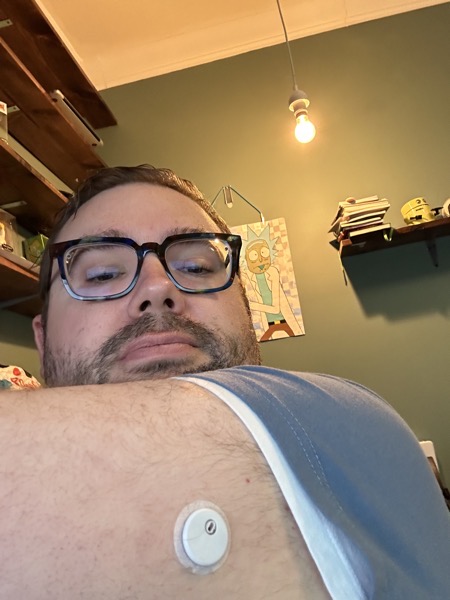
The sensor is considerably smaller and thinner than the Libre 1 and 2. I was surprised at just how delightful this smaller sensor is. You’re substantially less likely to brush a doorway and have the sensor get painfully ripped off your arm now, and because of the smaller surface area, you should be able to flex your arm more easily without feeling your skin stretching against the adhesive. The new sensors are also more accurate, with readings deviating from a blood test by an average of 7.9% (though as Nerdabetic on YouTube times union best online casino real money, this new 7.9% figure is based on a different method of calculating MARD, but it’s still more accurate than previous models).

Seriously, this new sensor is so small it’s cute, and it feels substantially less obtrusive than its predecessors, which were already considerably more svelte than Dexcom’s sensor + transmitter.
a selfie where i'm showing of the diminuitive size of the new Libre 3 sensor

The packaging and applicator have also been redesigned to use less material. Instead of the applicator and sensor being in two separate packages, they’re combined into one. The materials still aren’t recyclable, though Abbott has a online casino no deposit free spins australia to keep these out of landfills. Sadly, although they aren’t going into landfills, they are just getting incinerated to generate electricity.

But by far the biggest change with Freestyle Libre 3 is how you use it to get readings: you no longer need to tap the sensor to get data! Instead, the sensor is constantly streaming data to your phone via Bluetooth.

This makes checking your glucose as easy as opening the app. Furthermore, it helps ensure you have continuous glucose data because of the constant wireless streaming. Whereas previously you might have gaps in data if you go more than 8 hours between scans, you now get 24/7 coverage.

That means if I had a carb-heavy dinner and knew it was going to be bad news and didn’t bother to check, the app is dutifully storing the data nonetheless, and I can look back and check the next day when I feel more courageous.

Unfortunately, the mobile app is the biggest weak spot in all of this.

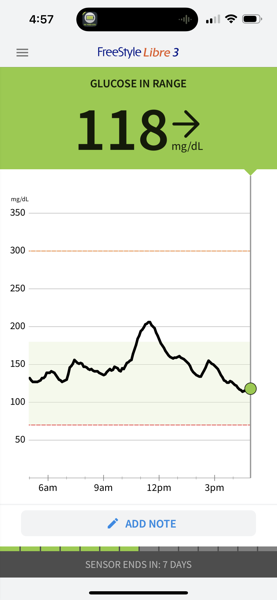
The mobile app basically shares the same design as the original FreeStyle LibreLink mobile app, whose interface was designed to pretty much offer a 1–1 mapping of the interface of the physical reader devices.

a screenshot of the FreeStyle Libre 3 app showing a chart of blood glucose. The latest reading is 118mg/dL

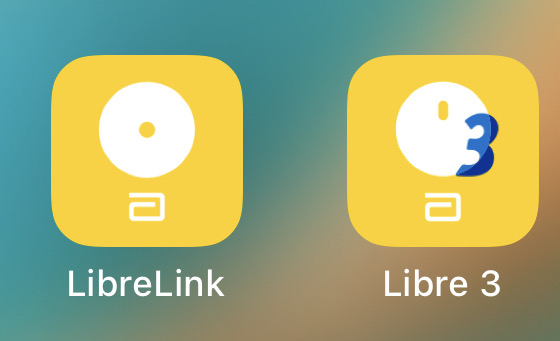
Not that you can always judge a book by its cover, but this is the amount of effort put into redesigning the app icon for the Libre 3 app; you can expect a similar amount of rework in the app itself:

a screenshot of the LibreLink and LibreLink 3 app icons side by side, to illustrate just how little effort Abbott put into making a revamped mobile app for their new system

The app doesn’t write data to HealthKit, so you’re stuck with whatever charts the app itself provides, and you can’t centralize your glucose data with the rest of your health data.

The biggest disappointment is that although the redesigned sensors open up a whole new world of possibilities in terms of giving you new ways to watch your numbers, the app does nothing new; it just displays the charts without making you tap the sensor with NFC.

Dexcom has let you directly view glucose data on your Apple Watch for years. Third party apps I’ve used like Tomato and xDrip4iOS will display the latest glucose reading as an app notification badge, which is convenient.

But from a first party I would expect even more, like support for home screen or lock screen widgets that show the latest reading or a graph. Hell, there should be Shortcuts support too! How cool would it be to have a Shortcuts action that retrieves your current glucose and lets you use that with anything you can imagine making a Shortcut for?

Sadly, Freestyle’s app for the Libre 3 does none of those things. If you want to see the readings, you have to open the app, which will show you a chart that looks identical to past versions of the app.

Is that such a terrible injustice? Not necessarily (I’ve seen the finger stick tests people had to use in the 80s and I feel lucky). But it’s a travesty to see Abbott sitting on all of these new tools available to them to make glucose readings faster and easier to access than ever before. And it gets doubly frustrating when I’m reminded that the sticker price of these sensors is easily over $1000 a year (my copay alone is $75 for two sensors).

You might check your numbers 3 or 4 times a day if you open the app, which is pretty good. But if all you had to do was glance at your watch to check your blood sugar, you’d probably check it an order of magnitude more! Or if you have one of these fancy new iPhone 14 Pros with the always-on lock screen, it similarly has the potential to make your glucose available with nothing more than a glance.

For that kind of money this should be one of the most polished apps on my phone, and it should be first in line to take advantage of cool new features that come to iOS. And I know that these mobile apps are subject to regulatory approval too since they effectively are medical devices, but so are the Dexcom apps. There’s just no excuse for Libre to be this far behind, and if past performance is any indicator, we probably shouldn’t expect any features to be added to this app… whatsoever.

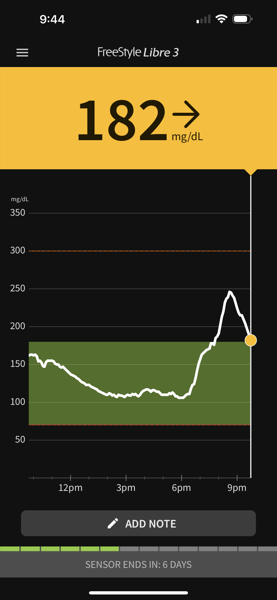
The app does support dark mode now, though, so that’s a plus:

a screenshot of the FreeStyle Libre 3 app in dark mode, showing a blood glucose reading of 182 after a higher peak that came after an afternoon of much lower sugars

Anyway, this app is either maintained by contractors Abbott is paying as infrequently and as little as possible to maintain the app, or I have no idea how their team of mobile developers spends its time. I’m hoping that xDrip4iOS or similar apps can close the functionality gap soon. #WeAreNotWaiting

If you are currently using a previous version of the Libre sensors, you can upgrade now if you’re in the US (it’s been in Europe for some time); just ask your endocrinologist to send in a new Rx. Libre 3 has the same cost as Libre 1 and 2, and Abbott will send you a coupon for a free FreeStyle Libre 3 sensor. If you use the free voucher, I recommend you call your pharmacy ahead of time to let them know that’s what you plan to do so they can correctly bill the voucher instead of your insurance company.

If not for the app missing so many easy wins, I’d be shouting about Libre 3 from the rooftops. Nonetheless, it’s really good! If you’re using the FreeStye Libre 1 or 2, upgrading is a no-brainer. You’ll pay the same cost and you’ll get a nicer, sleeker sensor with more accuracy, and you won’t be as likely to have gaps in your data. I seriously hope I’m wrong about the app getting new features and that Abbott might actually upgrade the app by itself with extra functionality.

Diabetes sucks, but tapping into my penchant for nerdiness helps me feel more like myself living with it. If you’re nerdy and diabetic (and you are fortunate enough to have good insurance if you live in the US), I recommend you try this approach too.