
Oct 29 2022

Twitter: Now what?

AI generated drawing of Elon Musk with a Twitter bird on his shoulder
Apparently Elon Musk officially owns Twitter now.

Twitter’s easily my favorite social network. It’s always fit in with how my mind works (at least when I use it with clients like Tweetbot). I’ve often found community on Twitter, and Twitter is influential and consequential. Revolutions have taken place because of Twitter. Before news is news, it’s often on Twitter.

And now it belongs to rich dipshit Elon Musk. Though if it makes you feel better, he’ll probably become less rich because of this acquisition!

Twitter has been severely mismanaged for its entire existence. They famously procrastinated on a business model until finally settling on “I guess we should put ads in things.” In the early days people almost exclusively used Twitter via mobile apps made by third parties, but then Twitter got increasingly developer hostile and pushed third party apps away, presumably to help make it easier to put ads in things (though they are coming back around lately to third party Twitter experiences). They’ve gotten more and more bloated as a company, and they’ve struggled to articulate a stance on content moderation, though in reality it’s played out as being uncomfortably permissive toward Nazi types.

Twitter’s Future: The Icanthascheezburger Three-Point Plan

Elon’s got his work cut out for him (which is unfortunate given how many CEO jobs he juggles). Even though I really don’t care for him, I do care about Twitter, so the consulting wing of Icanthascheezburger is laying out this simple three-point plan:

Improve the Financials

Twitter bleeds money. They have only turned a profit in two of the last ten years. Musk is quite wealthy on paper but actually isn’t particularly cash-rich and probably will want to get Twitter in the black in the next year or two.
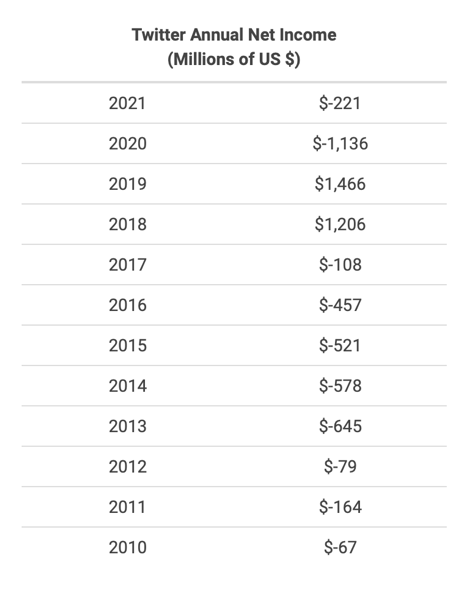
a table of Twitter's net income since 2010. They lost money every year in figures ranging from $67 million to $1.6 billion

And he’s hinted as much; he’s talked a big game about firing as much as 75% of staff, and that’s probably coming from a feeling of sticker shock, but also for Twitter’s size, 4600 employees is a lot and it would make sense to learn the ins and outs of the company and strip down to the bare essentials, then build from there. The strategy worked pretty well for Steve Jobs when he took over Apple. Of course, Steve Jobs was smart enough not to run his mouth with some estimated number of jobs he planned to cut before he even took the wheel.

And as of press time, it seems Musk isn’t troubling himself to learn what teams are doing before firing them wholesale.

Admit What Twitter Is and What It’s Good At

To boil Twitter down to its purest essence would be to describe it as a relatively small, relatively unstructured microblogging platform, where people build up their communities by hand-picking the people they want to follow. It’s a place for information junkies because the content is so concise that it’s almost a stream of consciousness. It’s deeply candid and honest.

And Twitter has spent most of its post-IPO years doing its very best to resist that.
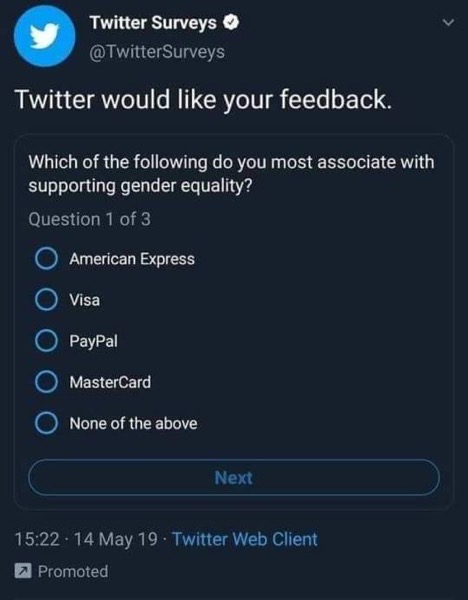
a cringe-worthy screenshot of a Twitter survey asking the reader how they associate a bunch of finance brands with gender equality

I don’t blame them; Twitter’s not a mass market product like Facebook, or most mass media. That’s why so many news sites take a single tweet and turn it into a 500-word article. Twitter is opinionated in how it works, and it caters to those information junkies who want the raw discourse injected right into their veins. Information travels around Twitter before it becomes news. It’s a primary source where you get the word directly from important people, not filtered through a PR person.

This Twitter is extremely valuable (and I think Musk correctly understands that), but it’s not valuable in the sense that Facebook got valuable. Twitter is a tool of massive cultural importance and consequence, but it’s not a network that will have billions of ad revenue-generating users, and for it to become that it would have to become something fundamentally different.

Twitter needs to do what Apple did post-Jobs returning, and what Crocs did a few years back: go back to basics and focus on what it’s best at.

But unlike Apple and Crocs, Twitter has to reckon with the issue that core Twitter was never a financial success, and that has to be solved for. I firmly believe it’s a solvable problem; the world clearly wants a thing like Twitter to exist.

Some ideas for how to accomplish this:

  • Make some staffing cuts, ideally without being a huge dick about it (show gratitude, explain the strategy of righting the ship, and give the departed good severance to show goodwill and ensure you can recruit new people)
  • Investigate how to simplify Twitter from a technical perspective so that it can be maintained with fewer engineers and less infrastructure (rumor has it that Twitter is inefficient in both team size and amount of infrastructure it runs to keep Twitter afloat)
  • Make Twitter apps feel more fast and lightweight, and easier to navigate
  • Invest heavily in Twitter Blue (the paid Twitter experience). I would set a goal to make 10–20% of Twitter’s users paid users, and price it so that paid users’ revenue was enough to keep everything running. Make the features in Twitter Blue super compelling and worth forking over money for. Make Twitter Blue an ad-free experience which is literally the biggest feature people ask for. Add power user features.
  • Monetize Twitter’s API, either charging developers to use it, or having third party apps that end users use also get advertising (for non-paid users). It’ll incentivize Twitter to keep investing in the API, and as the API gets better that will incentivize developers to make more cool new things on Twitter’s platform
  • As a corollary to monetizing the API, do revenue sharing with developers making Twitter apps for users. If you make a 3rd party Twitter client, serve up ads from Twitter and get a cut of that ad revenue, or a cut of the Twitter Blue subscription revenue. This will incentivize more great apps and add more Twitter users.
  • Make more features available through the API. Twitter power users are often using third party clients, and it’s good to give them access to new features.
  • Fix community management and content moderation. It stunts your growth if nobody feels welcome joining Twitter because you were tripping over yourself trying to make sure that assholes and Nazis feel welcome. There isn’t an anti-conservative bias on social networks (if you actually measure it, it’s the opposite). Hire lots of smart humans, build good tools for those humans to work well, and give the humans good, sound policies to enforce.

Build on Initial Success Once It’s Achieved

Twitter’s been trying to build out a bunch of new stuff over the past couple of years in the hopes that one of them will have traction and catch on and presumably make Twitter money. The problem is that new products like Twitter Spaces are the kind of thing you make when you have a successful and profitable core product and you want to expand. Twitter hasn’t yet made its core product profitable.

Musk has hinted that he wants to turn Twitter into an “everything app” like WeChat. That’s a dumb idea. Now, I get why a rich dude might salivate at the idea of making a super monopolistic piece of software that everything else is built on top of and dependent on, but WeChat really only took hold in China because, well, it’s China. Facebook tried doing it with Messenger awhile back and it kind of fizzled out.

But once Twitter finds financial success, then it’s a good time to start experimenting with totally new things. Hopefully these are things that actually build on Twitter’s core, not shitty attempts to make a copy of another social network that’s currently growing.

I can’t really predict what these things might be; Twitter has to figure this shit out for themselves. But the new features need to be Twittery.

I can’t quite define what I mean here, but I’m thinking of things that are lightweight, fast, and concise. They’re things that embrace the open web (like how tweets are accessible via public URLs, making them easy to link to and find and otherwise interact with). Good Twitter features add frictionlessnes to things, like how hashtags made it super easy to quickly jump into public conversations about things, or how quote tweets made it super easy to add some extra perspective to someone else’s thought (or mercilessly roast them). Veer too far from that, and you’re fundamentally making a different product. And it wouldn’t be bad to do that, but don’t do it under the Twitter moniker; spin up a totally new brand and app name, and experiment there.

What About the Rest Of Us?

Yeah, so I really didn’t mean to write this post as an unsolicited advice column for Elon Musk; I just couldn’t help but dig into and enumerate Twitter’s many misgivings.

But what are we to do?

I have severely mixed feelings. I think Twitter was getting short shrift on the public market and theoretically benefits from being private, but I have serious doubts about Elon Musk’s ability to run this company well (and given that Twitter engineers were told yesterday to print out all of their code for Tesla engineers to come review, it’s confirming my suspicions that Musk likes to act before thinking).

But for now, I plan to stick around, assuming nothing super disruptive happens to the way I experience Twitter. I use Tweetbot to scroll through Twitter, and it’s been solidly consistent, always showing me a chronological feed of tweets from exactly the people I follow and no one else. Twitter is special; it’s the only place where I can follow all these specific people I care about following and see what they have to say.

But it’s really important to me to keep investing in communities that use truly open tools.

This blog is itself one such thing; it’s built on the open web and it’s totally under my control. It’s not really much of a community, though.

I’m on micro.blog, though I’m not that active on there. I’m on Mastodon too, though I’m not that active on there either. I am an ardent RSS user and I follow a ton of blogs, most of which are independent. But I would like to see more people who are less tech-oriented to be making blogs again. And I love the open web because it’s easy to me to make my own little media bubble of exactly the things I care about, free of the bullshit of modern sites.

The problem with apps like Mastodon and Micro.blog (and others like Diaspora and countless other sites that sprung up) is that although they can be drop-in replacements for Twitter from a tech perspective (in the sense that they are apps for short-form microblogging on the web), Twitter isn’t its apps and APIs. The heart and soul of Twitter is the community, and it would be nigh impossible for me to get everyone I follow to move to one of these other sites. It would take a mass migration of some sort, which I don’t see happening unless Twitter really fucks shit up (which they totally could!).

Jack Dorsey has talked about making Twitter a protocol that Twitter is itself a member of, which would be really cool if it actually happened. That would mean I could move to apps run by people who aren’t Twitter while still being able to connect to people on Twitter, and it would be simpler to convince people to migrate off Twitter since they wouldn’t have to lose touch with followers or followees. I’d love to see this, and I actually feel like it’s more possible now than ever before now that Twitter is under private ownership, but I struggle to see how Twitter finds financial success in a world where Twitter is one network of many that are just like it and interoperable with it.

But despite what paperwork may say, Twitter still belongs to the masses, and because Twitter’s financial value hinges on the masses continuing to show up and participate, I don’t feel hopeless.
Oct 18 2022

Keeping My Twitter Receipts in DEVONthink

Previously, I discussed a custom-built app I made called Receipts, which can convert tweets into Markdown files for me to archive and catalog. Now let’s talk about how I use DEVONthink to actually catalog them!

These Markdown files are just files sitting in folders on my Mac (the folders aren’t organized by anything in particular but I do split them up as they get big), and I have DEVONthink set up to index folders on my Mac, as opposed to actually importing them into databases as copied items.

I’m actually quite a big fan of using DEVONthink like this with files. The files themselves are the canonical source of truth, but DEVONthink gives me more organizational power. I can organize and search in DEVONthink, and most importantly, I tag tweets in DEVONthink. An added bonus: because the tweets are just Markdown files on my Mac, when I tag them in DEVONthink, those tags are added to the underlying files and are visible in the Finder too, and vice versa.

Armed with these tools, I tag the shit out of tweets.

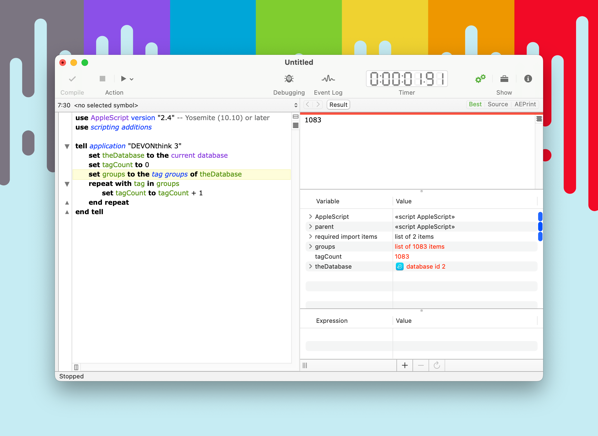
Seriously, I have over 1000 tags:

screenshot of Script Debuger app showing that I have 1083 tags in DEVONthink

And they range wildly. I have some highly generic tags like funny or good news, some that are of a more specific genre like called out, and some are oddly specific, like frugal but secretly wealthy (which refer to those “financial advice” articles you always see about how some 25 year old survives NYC on $25k a year and once you dig past the “I don’t have a Netflix subscription” you find the more salient “my parents pay the rent” lede that got buried in there). I have some tags for specific people (the elon musk tag has gotten pretty full).

I save up batches of tweets to tag. That’s partly because I am not very on top of things, but also this ends up working nicely because patterns sometimes emerge in the tweets, especially with breaking events.

Having tags for specific viewpoints or theses is really useful, because the tags become de facto lists of things, and I now have lots of very specific lists of things, like instances of bad takes about covid, or things that aged poorly, or people as things (e.g. Noel Fielding as cakes, Sir Patrick Stewart as Vacuum Cleaners, Tilda Swinton as libraries, etc.)

Some unsolved problems do remain. One thing DEVONthink lacks (that I really miss about Evernote) is the ability to search text in images. A lot of tweets are images of text or at least contain text that’s not otherwise in the tweet (like images of comics). AI text recognition is getting better so I could perhaps update Receipts to include text annotations of images in the tweet file, but I’d like for that to remain either as metadata as opposed to file content, or just be a thing that DEVONthink can natively search. Alas.

Now, the biggest question: Has this actually helped me do what I set out to do?

Sometimes!

In reality I don’t talk as much on Twitter as I used to, so I don’t really need to show up with receipts all that often. It’s nice to have them at the ready in private discussions, though.

I’ve been in conversation with friends and they’ll mention that Andrew Cuomo isn’t all that bad, and I can pull up my cuomo is trash tag and very quickly point out years worth of shitty behavior on his part.

One of the first tags I made, Doesn't Violate Community Standards, was me trying to put a name to a pattern I saw a lot on Twitter: when vulnerable people reported people harassing them on social media, the response was often that the person “didn’t violate community standards,” yet conversely vulnerable people would often get punished quickly for small and innocuous infractions. I knew it happened a lot, and even when I favorited tweets talking about it to save for later I’d lose track. Actually creating a named tag and tagging tweets with it now makes it possible for me to show a clearer picture of this issue and be backed by actual instances of this happening.

If I know exact text matches for a tweet I’m trying to remember, it can be super quick to find it in DEVONthink now. It’s not perfect, though! One day I was searching for a very specific tweet and I even knew the specific word being used in the tweet and I failed to find it because it never imported correctly. Luckily, I also remembered who tweeted it so I used Twitter’s advanced search to find the original tweet, and i made sure it imported.

But the actual benefit of keeping receipts on Twitter has been deeper than “let me find this tweet fast”. I found that the ritual of going through the most notable tweets in my timeline and tagging them later is really useful for me. It helps me see connections between things better, and the ritual of tagging gets me in the habit of putting a name to the tweets that have something in common. It helps remind me of recent events. And in many cases I get to enjoy a laugh from earlier in the week once more.

Receipts is also useful as a tweet archive. Tweets can sometimes disappear, and knowing that my computer can instantly archive a tweet to my hard drive is comforting, because sometimes really valuable things get deleted from Twitter for various reasons, from copyright issues to the tweet author growing to regret tweeting the thing.

Once you’ve amassed a big enough collection of this content in DEVONthink, the database becomes sizable enough that it’s its own sizable body of knowledge. It’s something that you can explore and go spelunking in, finding nuggets of information. You can look through tweets that you liked in July of 2021 to see what mood you and the world were in that day. If you were really interested, you could do some analysis on the data and look and see if there are correlations between tags.

I think it’s a really nice reward for what amounts to a handful of minutes of work every week.


Oct 17 2022

Keeping the Receipts on Twitter

an AI-generated image of a receipt with the Twitter bird on it
For years I had this frequent frustration where I wanted to reference a tweet, but then after the fact I couldn’t find it to save my life.

To try to make this easier on future me, I started getting in the habit of favoriting every tweet that I remotely thought was interesting. This was nice, but I quickly discovered that it’s actually really difficult to find favorited tweets after the fact, in part because Twitter sorts them by the date the tweets were written, not when you favorited them.

Eventually this became a big enough annoyance that I reminded myself that I can program so I decided “fuck this, I’ll build my own thing.”

But also, like any good developer, I have a keen sense of the amount of effort that goes into making even a seemingly simple app. Also, like any good developer, I’m really lazy.

As such, it was my goal not to try to reinvent everything. I already had an app for cataloging information: DEVONthink. And I trust DEVONthink to handle tagging and shit for the thousands of tweets I’d want to bookmark better than I’d trust anything I can cobble together in my spare time.

So all I had to do was get tweets into a format DEVONthink could index, and I was golden.

Then it came to me: what if I converted tweets into Markdown files? Turns out, Markdown is a great way to represent tweets. You can embed images and videos, and Markdown also has a way to quote blocks of text, which is absolutely perfect for quote tweeting.

So, I built a small app called Receipts. It’s a good mix of being over-engineered and under-engineered, but its purpose is to import tweets and convert them into Markdown files.

Receipts can download entire tweets, including their attached photos and videos. Receipts will also recursively download quoted tweets, as well as all of their attached photos and videos.

Receipts runs on my Mac. I have an app called Hazel watch a Dropbox folder for new files. Whenever I want Receipts to save a tweet, I add a file to this Dropbox folder. The file’s content is simply the URL of the tweet (and if I have a batch of tweet URLs I can stick them all in one file). Hazel will see the new file, tell Receipts to import the tweets, and then move the file to the processed folder.

Making text files and saving them into a Dropbox folder is tedious, so I made a few tools to simplify this.

I already had a massive back catalog of favorited tweets from over the years, so I downloaded my https://icanthascheezburger.com/mcluck-casino-no-deposit-bonus/ and grabbed all those tweet URLs to backfill receipts. A lot of old tweets 404ed, but my import script handled that okay. One other interesting issue: Twitter didn’t always natively support images in tweets, so back in the day, services like Twitpic popped up to fill that need. But Twitpic is long gone, so any old tweets I have that had image links to Twitpic were lost to the ages (and, of course, my script doesn’t read media from third party sites… yet).

Initially, my goal was for all my favorited tweets to automatically get catalogued. So I used an https://icanthascheezburger.com/slots-n-roll-casino-no-deposit-bonus-2026/ recipe that would trigger whenever I liked a tweet, and save the tweet URL to my Dropbox folder. This worked well enough, but I mgm casino app not working.

I decided to settle on just explicitly marking tweets I wanted to save to Receipts instead of using favoriting. Now that Twitter notifies the author of the tweet that you favorited it, I actually prefer not having to favorite (especially since I’m not necessarily bookmarking tweets out of admiration).

I made an Alfred workflow that can take a tweet URL from the clipboard and save it to the Dropbox folder.

For my iPhone, I built an iOS Shortcut. It’s set up as a Share action, and it will save a URL to the tweet in a file in a Dropbox folder for you. This iOS shortcut also works on the Mac, but because macOS still doesn’t let you have shortcuts as share actions, I use Sharebot to make it possible to save a Twitter receipt from the Share menu.

At this point, I just need to get them into DEVONthink, which we’ll talk about in a future post.

If you read this and you thought “wow, this sounds like a reasonable, well-designed piece of software and I would like to run this on my own computer,” fork it on GitHub and start playing around with it!


Oct 8 2022

MagSafe is a Seriously Underrated iPhone Feature

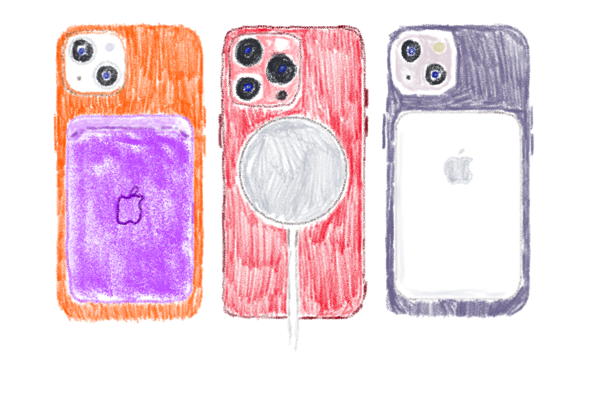
an illutration of iPhones using MagSafe accessories
Full disclosure: I’m an absolute sucker for products with robust accessory ecosystems baked into their design (have you seen my Apple Watch band collection?), and so of course I’m going to like this.

Fun fact: if you’ve got an iPhone 12 or later, it’s got MagSafe.

Maybe you didn’t even know your iPhone had it. But it’s there, and it’s delightful.

Simply put, it’s a circle of magnets on the back of your iPhone that lets you attach accessories to it, including accessories that can charge your phone.

And like a lot of things Apple does, that sounds really mundane, but through really good execution it’s an enjoyable and (dare I say) whimsical feature.

It’s a great way to wirelessly charge your phone. Qi charging has been a thing since the iPhone 8 (and it still is a thing) but with MagSafe, it holds the phone in place so you don’t wake up to find your battery’s at 8% because you set it a half inch too far to the right on the charging pad the night before. There are even MagSafe battery packs you can use on the go to give your battery a boost without an unsightly cable connecting your phone to a portable battery pack.

But charging is only half the fun of MagSafe. When I’m cooking and I want my recipes at eye level, I have a MagSafe wall mount on the cupboard (this is also perfect for FaceTiming when cooking). There’s also a wall mount on my bathroom mirror. I’ve got a little MagSafe stand on my desk that I can stick my phone on too (perfect for the new iPhone 14 Pro with its always-on screen).

And the latest addition to my MagSafe accessory collection? PopSockets. The original ones stuck to your phone with adhesive, but MagSafe is a perfect way to be able to use PopSockets without the commitment of actually sticking one to your phone.

And therein lies the beauty of MagSafe. It lets you have accessories for your phone, but you’re never super committed; you’re just a satisfying magnetic click away from swapping one thing out for another, so you can pick what’s important to you in the moment. Need a little battery boost? You got it. Planning to do a little drinking tonight? Stick a MagSafe case on your phone for peace of mind (and then put another MagSafe accessory on the case!). Want to save pocket space? Ditch your wallet tonight and stick a MagSafe one on your phone†.

And what I really love is that MagSafe accessories will work from phone to phone (except maybe with your phone case). That means you can amass a collection of goodies for your phone with confidence that you can keep using them several iPhones from now, even if you want to jump from the iPhone 13 mini all the way to a Max sized phone.

†Also: PopSockets themselves have hot swappable PopTops so you can change up the way your PopSocket looks at a moment’s notice. Accessories for the accessories? Yes, please!