Feb 14 2024

Mini-Review: CarlinKit 5.0 Wireless CarPlay Adapter

tl;dr: This adapter is solid, and if you have a wired CarPlay car that you want to make wireless, you’ll be happy with this.

I’ve been thinking about trying a wireless CarPlay adapter for years and finally decided to give it a shot after having some Bluetooth issues with my car and my iPhone 15. On Accidental Tech Podcast Casey mentioned on multiple occasions his go-to recommendation was CarlinKit’s, and despite the fact that Casey is always the one getting roasted by the other two hosts for his tolerance for janky computer setups (by now a years-old inside joke after it was revealed Casey was using bad memory in his iMac for weeks that was causing daily kernel panics), I gave it a go.

Wireless CarPlay adapters never seem to be made by brands whose name you’ve heard of. That, combined with the fact that being wireless surely would add latency, always kept me skeptical. Some adapters also seemed to require you to join a Wi-Fi network the device broadcast before you could connect, which I always suspected would be flaky since I usually am next to my house when I’m getting in the car, so I worried the phone wouldn’t switch networks.

Setup

The CarlinKit uses a combination of Wi-Fi and Bluetooth; I never had to visit my phone’s Wi-Fi settings to set this up; I just paired the device using iOS’s wireless CarPlay setup, and once it was configured, CarPlay was on my screen. The Wi-Fi connection negotiation seems to happen over Bluetooth, which is exactly how I prefer for it to work.

CarPlay Experience

Using CarPlay wirelessly feels… fine! When I’m using the controls I don’t see any screen latency whatsoever.

Audio is a bit more delayed than with wired CarPlay. When you hit play/pause/skip, expect it to take 2–3 seconds for the audio to change. It’s similar to AirPlay in that regard. It’s a little annoying, but less so than I expected it to be.

Connection Speed
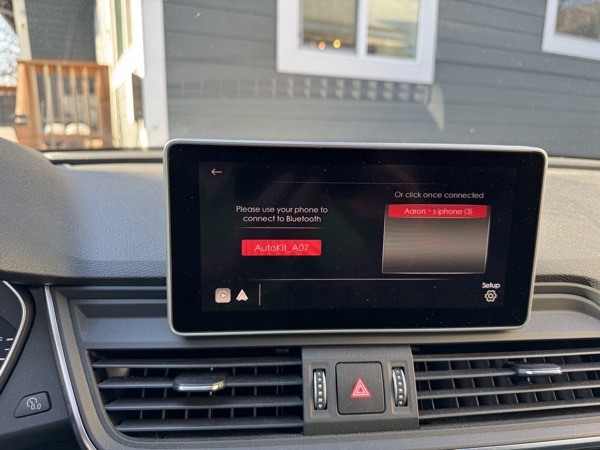
my car's infotainment screen displaying the CarlinKit's connection interface, showing that you can choose from a list of connected Bluetooth phones

The amount of time I need to wait before my phone’s CarPlay interface is on my car’s screen varies wildly.

Sometimes, if I unlock the car before getting in, the CarPlay interface is ready right after I start the car (which is faster than even wired CarPlay). In other cases, I’m waiting a little bit for the phone to establish a connection to the device, during which time the device presents a screen indicating that it’s awaiting connection.

Multiple Devices?

The CarlinKit allows you to pair more than one phone to it, and if you do, you can choose phones from a list when you start the car. This is handy if you and a partner use the car and both have your phones paired, and then both of you get into the car at once.

I personally have not tried this yet as I don’t share the car, but it looks straightforward. Also, I’m not sure how this experience compares to a car with wireless CarPlay as a factory feature.

Verdict: 👍️

Perhaps the best praise I can give this is that now that it’s there, I don’t think about the adapter. It just feels like my car is factory equipped with wireless CarPlay, and that’s exactly how using an adapter like this should feel. Video isn’t flaky or laggy or otherwise lower quality. It just works.

Having wireless CarPlay is a huge quality of life improvement in my car, perfect for when I’m running errands and I’m jumping in and out of the car a lot.

It’s also not an irreversible commitment; I can still use wired CarPlay if I’m going to be driving for a longer trip and want to charge my phone too.

Feb 12 2024

Vision Pro’s Trajectory

As I’ve been using Vision Pro and figuring out its strengths and shortcomings, I find myself trying to understand its place in the world once it evolves.

Thinking about Vision Pro as a computing platform, it feels much more iPad-like than Mac-like. The eye and hand tracking input mechanism feels like touch input, but adapted to being able to be in 3D space. But much like how the iPhone’s and iPad’s touch input mechanisms are in some ways limited compared to the precision and speed you get with a mouse and keyboard, Vision Pro’s eye tracking input feels like a limited version of iPad’s touch input. Even assuming all the accuracy issues get ironed out, tracking my eyes and fingers is still a much slower interaction mechanism.

As I’ve used Vision Pro more this week, my leisurely use of it has had it replacing my iPad or iPhone a lot, because as a casual computing device, it’s a supercharged version of iPad (and I understand what a weird comparison that is given how different the two devices look). It’s immersive and personal, but you’re not constrained by the relatively small screen size of iPad. As good as iPad is for watching video, Vision Pro absolutely kicks ass. And if you have a keyboard on your lap, it’s a killer couch computer for the kind of person who loves to be watching a TV show while also messaging with friends online and casually browsing feeds and such.

If Vision Pro got to the point where it was a pair of glasses you wore, then it starts being able to overlap with your iPhone too, and even improve upon it since you don’t have to be staring down to look at it. But that still feels at least a decade away, give or take.

When it comes to more serious computing, Vision Pro as a standalone device doesn’t make sense. Interacting with it isn’t fast and precise enough, even if you ironed out all the current Vision Pro input issues and gave the Vision Pro more field of view and higher resolution and enough compute power to always render your full field of view. But as it evolves I suspect it will be an incredible companion device for the Mac, offering a display that is bigger and more immersive than anything you might be likely to have on your desk, and using high quality audio and visuals to help give you a sense of your own space to concentrate on deep work. I could even see macOS getting some updates to offer affordances to make it work better in the visionOS environment, and that alone could sell a fair few Vision Pro devices, and it makes the Mac an even more compelling platform for people.

So five years from now, I don’t see Vision Pro being a device sending Apple into another stage of hyper-growth like the iPhone did a few years into its life. It might grow into a decent sized market of its own. If five years from now Apple was selling the same number of iPads and Vision devices I would consider that an amazing win (assuming iPad sales don’t get too cannibalized). But I don’t think in terms of device sales we’ll see Apple getting catapaulted into a new category of success.

I suggested last year that Vision Pro was somewhat of a long shot. As a standalone product, as much as I adore mine I think it still is. But Vision Pro’s success doesn’t have to be from its own device sales alone. It’s a great test bed for new technology that could make its way into other devices.

Imagine the eye/hand tracking being in an iPad (or a HomePod device with its own screen) so you could have a device sitting on the counter displaying something, and still be able to interact with it from afar in your kitchen, even if you’ve got dirty hands. Imagine a future version of iPadOS where you can plug an iPad into a big monitor or two and have the same level of precise control over placement of apps you enjoy on Vision Pro (yeah, Stage Manager is a thing but let’s face it, it’s a real dud so far and needs Apple to make some serious investments). I can see Siri getting better on all platforms because Apple made investments in making it better out of necessity because visionOS could use better voice control. Or more generally, I could see all Apple portables getting better because Apple learned a lot from cramming so many components into the tight confines of Vision Pro.

That’s the thing about Apple now. Their product lines aren’t just silos; they make each other stronger. The iPhone is the most profitable consumer device of all time because it leveraged the same core OS as the Mac. iPad borrowed heavily from iPhone. Apple started using its own in-house design of chips starting with the iPad and iPhone, and that made Apple Watch possible, then Apple applied that knowledge to supercharge the Mac with M1/M2/M3 chips, and these Mac chips in turn are powering high end iPads and making Vision Pro possible as a device. Siri started off as an iPhone feature, but it’s now baked into every Apple OS, and in the HomePod it is the entire experience. And all of these Apple platforms rely on the Mac because developers use the Mac to make great software for these platforms. I suspect that Vision Pro’s biggest contribution to Apple won’t necessarily be from sales of the device itself, but its contributions that make these bonds even stronger, and give Apple even more core technologies it excels at.


Feb 7 2024

🟢 Vision Pro: Spatial Computing

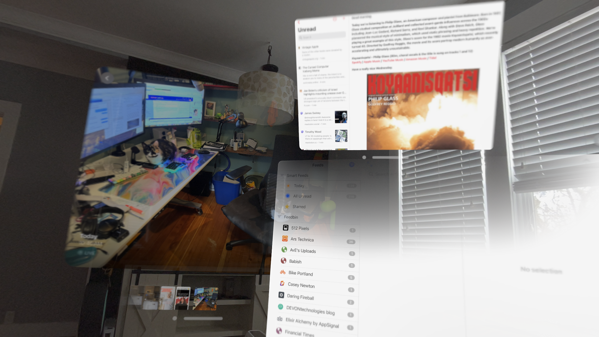
screenshot from visionOS of NetNewsWire, Photos, and GoodLinks running
Apple has been really clear in their messaging that this isn’t an AR headset or a VR headset; it’s a “spatial computing” device. I suspect 50% of the reason they did this was because they want an iron grip on their PR messaging for this product and don’t want it compared to other devices you strap on your head, but also, it’s clear that Apple sees this as the part where they can uniquely contribute to this market.

I love being immersed in my computer. I use my Mac with two massive 27“ 5K displays, and I very badly want a bigger display but my only two choices are an overpriced XDR display from 2019, or Dell’s hideous monstrosity of a 32” 6K monitor. Whenever I’m at a bank or a car dealer watching the employee using a 17 inch 1080p monitor with an equally mediocre slow computer, I feel for them, because to them a computer is just this dull, uninspiring tool that is probably holding them back from being able to work better because the IT department is so budget constrained that they’re getting the cheapest computers possible.

Computers are great when you have a lot of screen real estate, and the Vision Pro gives an amazing demo of what computing could feel like if it wasn’t encumbered by the limits of your computer screen.

The night before I wrote this, I blew through my Vision Pro’s battery sitting in my hammock chair, with a lap desk with my Pancake keyboard (a Planck-like keyboard I built from a kit that has Bluetooth support) connected. My cat Milo was curled up by my feet, and I had a Simpsons episode playing, a giant Messages app window in front of me, a browser window open, and a couple other apps here and there. I alternated between having the passthrough mode enabled, and being in the desert.

It was such a cozy experience! It’s great for watching movies and TV shows because it gives you that “second screen” experience where you can be looking at IMdb or looking up some fact about something while watching, but without having to crouch down looking at your phone.

The spatial computing concept is very simple and you will take to it like a duck to water. You press the digital crown to bring up the Home Screen which will look familiar to any iOS or iPadOS user. You look at an app and click to open it. App windows have a white bar underneath them, which you can “grab” by pinching when looking, and then you can move the window around in three dimensions. And you can push a window away, or pull it toward, you, and it’s kind of insane how that feels. An app window that’s 18 inches in front of your face might take up the same amount of space in your field of view as a much larger window you moved 10 feet from you, but just like how you can feel the difference between a small TV close up and a large TV far away, Vision Pro gives you the sense of depth, and it’s fucking magical.

As a 1.0 thing, Apple has nailed it. It’s basic, and it’s not in a place where I could use it for general-purpose computing, but it’s a foundation I’m very happy with (and given that visionOS is based on iPadOS which has a strained history with app/window management, I am relieved). This is closer to how I wish multitasking worked on the iPad, and I hope that some of these concepts actually find their way there because Stage Manager and every other attempt Apple has made to make the iPad multitask has been a dud.

There are some rough edges still. The interface is radically spatial, and that means if I opened Safari in my dining room, and walked into my office, that Safari window is still hanging there in my dining room (and if you have it floating in the middle of the room you can literally walk alongside and behind it, and when you’re behind it it’s just a white rectangle). But if I open the app launcher and click on Safari, it seems like nothing has happened, because even though it did activate Safari, I left Safari in the other room (sometimes the future is just hilarious). I can see some interesting potential there! If Fantastical offered a wall calendar mode I could adorn one of my office walls with a calendar. Instead of having a calculator on my desk, I could put PCalc on my desk. It gets exciting fast when you think about what you could do.

But also I am immediately craving more advanced window management because that makes me productive. Something like Mission Control, or the cmd-Tab app switcher, or an equivalent to Alfred, or the ability to have widgets I can put places, or the ability to make a preset workspace with certain items/apps on my desk/walls in a room, and quickly restore that workspace after a reboot. In a decade, visionOS is going to have a lot of these things, but the trickle of new stuff each year is going to feel glacial for the first 3 or 4 years, just like it felt glacial with the iPhone and iPad. I don’t know if y’all are old enough to remember, but the first iPhone shipped without copy/paste, an app switcher, the ability to send MMS messages, or even the ability to move around the home screen apps at will! But the original iPhone was nonetheless a blast to use, even with the very first iPhone OS (full disclosure: I didn’t buy an original iPhone; I got an iPod Touch a few months later, and loved it).

But this is S tier. Apple has nailed this conceptually. They have provided a reference implementation of the rudiments of how apps should work on a spatial computing platform, and now it’s hard to imagine it working any other way. And in 2–3 years you can bet that apps in all the other VR headsets will offer a half-baked version of this experience for a fraction of the price and grow the market, and those headset makers will nonetheless poke fun at Apple for being late to the market.

And this is characteristically Apple. They wouldn’t have shipped this if they didn’t have something that felt adequately differentiated from the rest of what was being offered.


Feb 6 2024

🟡 Vision Pro: Virtual Mac Display

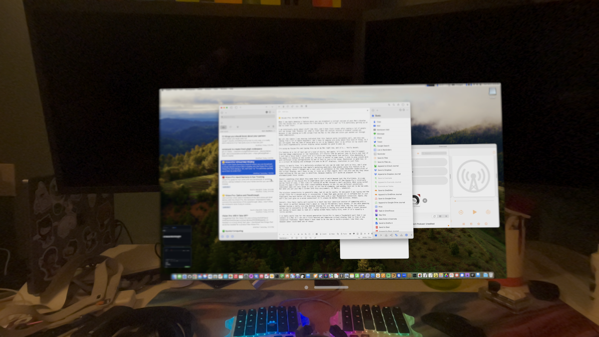
my desk through the eyes of Vision Pro, with the Virtual Mac display in view.
When I saw Apple demoing a feature where you can broadcast a virtual version of your Mac’s display into the Vision Pro, it put Vision Pro from being a “eh, we’ll see” to “I’m definitely getting up at 5am to order this”.

I am notoriously picky about stuff like this, and I have trust issues after seeing a lot of people tell me things like “Sidecar for iPad is fine” when the initial version of Sidecar sucked ass because it was sending an h.265 stream from the Mac to the iPad and colors got washed out through video compression.

But all the rumors I was hearing indicated that this feature works incredibly well, and this was coming from a lot of Apple engineers, who I have to imagine are picky about this kind of thing. So I was intrigued. And the idea of being able to sit in my hammock chair in my office (or my couch) and use a more ergonomically correct display setup sounded too good to pass up.

I’m using my Vision Pro and typing this up on my Mac right now, and it’s… fairly decent. It feels like I’m looking at a decent Mac display that’s not as bright as usual, and the display looks fine, but it feels like my own vision is blurry, like I’m using the wrong lenses.

I find myself thinking that if I just had a focus knob I could turn it a little and things would look perfect. Also depending on the angle I’m looking at the screen at, the blur is better in some cases. I plan to play around more with different strap configurations to see if this is just a fit issue. Resolution is good too; it is a virtual 4K display and although I’m used to 5K 27" displays, resolution doesn’t feel like a limiting factor.

Latency is mostly fine. It’s definitely wireless but you can do some real work on this, and I plan to. I found it interesting that Apple’s marketing materials show people using this feature to do video editing, which I thought was a real vote of confidence in the video bandwidth capabilities of the virtual display, and I have to say it lives up in that regard. And I can also see why they chose video editing as the use case to advertise, because reading isn’t quite as pleasant through a Mac as it is reading on a Vision Pro native app. I experience some wireless spottiness, and sometimes the device is reluctant to connect, making me lament why Apple stubbornly refuses to give us Thunderbolt connections to use other Apple devices as displays for my Mac (hell, the iPad Pro even has a Thunderbolt port already, for fuck’s sake!).

Some of the podcasters who reviewed this feature kept talking about how good Virtual Mac Display was, but they kept emphasizing that they probably wouldn’t use it a ton, and I couldn’t fathom why, but now I think I understand what they mean. The Virtual Mac Display looks kind of weird in a way that the rest of the Vision Pro UI experience doesn’t. Because of the Vision Pro’s relatively narrow field of view, I feel like I’m looking at my Mac through a small porthole. When using normal Vision Pro apps I don’t feel that claustrophobia because it has its own different conventions. Individual apps are very large in size, as are the UI elements, and windows tend not to be too wide. But when you put your Mac’s screen into this environment, it feels… unnatural. Funny enough, I was looking at a screenshot of a classic B&W Mac on my Vision Pro and it looked fantastic, because it was about 6×6 feet in my field of view and it was classic Mac resolution, so everything on screen was plenty big. I think that might be the more correct way to use a Mac on Vision Pro to get the best visual experience. But also, that feels like such a missed opportunity to constrain your virtual Mac display like that.

Overall, this feels really well-suited to a short two hour immersive session of computing with a Mac, which is perfect because that’s about as long as the battery lasts anyway. If you were debating between buying a really nice big desktop display for your Mac versus this, buy the real display unless you’re constantly on the road. I look forward to having this with me when I travel because not having to hunch down to look at a laptop screen feels really nice, even if it’s visually a little weirder.

I so badly would like for a future Vision Pro to have not only a much bigger field of view, but also a Thunderbolt port that I can connect to a Mac so I can use a truly massive and immersive virtual display that is free of any connection flakiness. That’s a $5000 product by itself, right there. And Apple doesn’t even need to be the one to build a product like that; any headset maker could make something that works as a Thunderbolt display; you don’t need any special private Apple APIs for that.

When I take the Vision Pro off and sit back down at my desk with my super nice monitors, I immediately think “this is so much nicer,” but after a few minutes I do inevitably think “I still miss sitting on the couch to use my Mac with a big display in front of me”. This feature doesn’t just help close a functionality gap while we wait for the visionOS platform to flesh out; it’s an escape hatch that gives me the ability to do Mac things on my Vision Pro, and I like that existing.


Feb 5 2024

titanbet casino app

a photo of my cat, Miss Honey, on my lap as taken by my Vision Pro. If you're thinking that it's kind of a crappy photo, you're right.
Last summer when select members of the tech press got brief demos with the Vision Pro, the reviewers’ impressions really oversold the experience of the passthrough video. I don’t think the reviewers were trying to oversell it; I suspect that it was a side effect of how tightly Apple controlled the demo environments, preventing the reviewers from being able to experience any issues. I was left thinking I’d be able to wear Vision Pro and reasonably see out of it to do household tasks, albeit with a bit of a haze.

In exactly one aspect, the vision passthrough is like magic. As you move your head around, what you see on screen keeps up with you perfectly, with no lag whatsoever. That is really quite good. I can competently have a conversation with my boyfriend and see him pretty well, and I basically can move around the house without feeling disoriented. It is easy to forget that you are looking at a pair of screens and not just looking through some glass.

The problem is that although it feels like you’re looking through glass, it’s a really lousy piece of glass. When you move your head the view keeps up with you. You can’t make out details in the world around you with Vision Pro on. It would be an exercise in frustration to do something nontrivial on your phone. As you move your head around, you will see some motion blur on the things you’re looking at. It seems worse when you’re looking at the things in passthrough, but apps in the Vision Pro do it too, to a lesser extent. It’s weird. But again, I must emphasize, when you move your head around, the movement keeps up with you absolutely perfectly in terms of what you see.

For a VR headset, I suspect this is the correct tradeoff; the brain is very sensitive to vision lagging and it will quickly lead to motion sickness in a lot of people, and it’s better to have that rendering always happen with minimal (and I’m talking 12 milliseconds) latency at the cost of some image fidelity because the brain tolerates that lack of fidelity more.

One feature I was hoping to see in Vision Pro was the ability to have a window stay in one position in my field of view and follow me as I move around, like a real life picture in picture, so I could move about the house and do some tasks while watching a video casually or something. But I get why that feature isn’t there; it just isn’t pleasant to rely on the passthrough view to actually do anything with what you see; it’s mostly there to give you a sense of place.

The app https://icanthascheezburger.com/wheel-of-fortune-casino-nj/, a recipe manager for Apple platforms, made a Vision Pro app, and they did some super cool stuff, like letting you place timers throughout your kitchen so that the timers themselves are sitting next to the thing they’re timing. But I’m not sure I’d feel comfortable trying to cook a meal with a Vision Pro on; it would be limiting my vision too much. I might give it a shot this week and see.

I don’t think the problem is with the 4K cameras in each eye, or even necessarily the cameras (allegedly they’re 6.5 megapixels, which isn’t great but not terrible). The challenge is that Vision Pro needs to be able to render your field of view for you constantly, in real time, with so little latency that you don’t feel motion sickness or get disoriented. And to render all of those pixels in perfect focus would take more compute power than Apple could cram into this first Vision Pro. Even when I’m holding still, the Vision Pro isn’t able to render my entire field of view in focus; it uses hans and heidi slot machine to watch where my eyes are looking and put more effort into rendering that part of the image in focus, and the parts in my peripheral vision are rendered with less fidelity.

Overall, the rendering of on-screen things like apps in the Vision Pro is decent. I use 2 27" 5K Retina displays at my desk and the rendering isn’t quite that nice, but it’s still good and text is not pixelated, but sometimes things are blurry, like I’m looking through a microscope I need to turn the focus knob on a tad. Focus is uneven too; if you’re looking at just the right angle things look just perfect, but the outer edges of the displays have a bit of a vignetting effect and a little chromatic aberration, and stuff that isn’t dead center is blurrier than what I’m looking right at. I can improve this somewhat by fiddling with the positioning of the headset on my head, but I sometimes wish that there was just more fine tuning available.

Some of this makes me think I might want to go to an Apple Store with one of every Zeiss lens insert strength and just try a few different ones and see if something different is better, then see if I can get my optometrist to write me an Rx specifically for new lenses, simply because the nature of the blurriness feels optical in nature, not the result of something like foveated rendering. But professional reviews also noted issues like this, even those from people who don’t wear glasses, so I think this might just be a v1 limitation.

I originally scored this as 🔴, but after spending more time with it I’ve softened up a bit and I just accept it as a thing that can use some work, but it’s not a dealbreaker.


Feb 4 2024

🍔 Getting Acquainted With Vision Pro

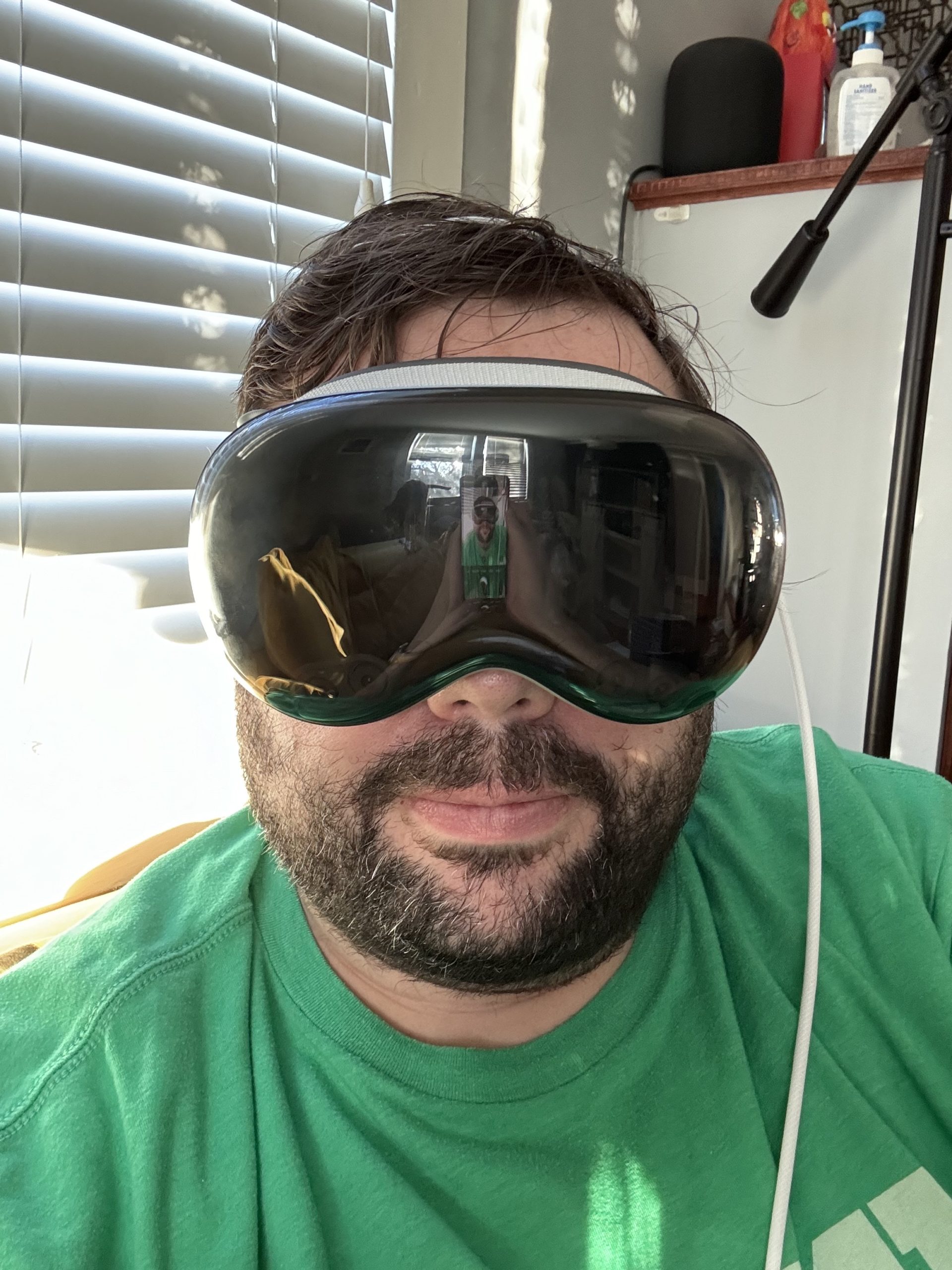
a selfie of me in a green shirt wearing my Vision Pro on the couch

When the review embargo got lifted earlier this week, my eyes were glued to screens, watching people’s impressions and getting a better understanding of the nature of Vision Pro. My excitement for Vision Pro grew from “casually interested and curious to what this will be like” to “I had trouble sleeping one night due to the excitement.”

I am not prominent enough to have gotten a review unit, so my review isn’t going to be that kind of review; the professionals did a great job of enumerating everything about the device. You should check out some of the other reviews first. Nilay Patel’s review is excellent, and if you want a more fun one, Joanna Stern did a delightful review where she characteristically did the most outrageous things you can imagine.

I’m just going to share some thoughts about the things that struck me the most about Vision Pro using it over the past couple of days.

This would be way too boring to read as a single post, so I’m going to break it up into multiple categories, going into more detail in each one.

Verdict: It Takes Some Getting Used To But It’s Awesome

My opinion of Vision Pro has evolved rapidly over the course of the last 48 hours.

I usually am getting a new iPhone on a yearly basis nowadays, and I routinely buy the first generation versions of Apple products, but this is deeper than that; it’s Apple’s first attempt at a brand new category of product, and one that you interact with in a radically different way than any of their products beforehand. The 1984 Macintosh fits that category, as does the first gen iPhone. iPod kind of fits this category but it was a relatively simpler device and didn’t make the same splash when Apple released it.

I think over time we’ll look at the Vision Pro as the biggest stretch Apple has ever made venturing into new product territory. Maybe if you factor in company size the iPhone wins out as a bigger stretch because today’s Apple is a size not even in the same league as it was when it was developing the iPhone, but in absolute terms, Apple put incredible effort and resources into making the Vision Pro. Hell, they literally designed custom silicon just for this thing, something they didn’t have the capability to do when they developed the first iPhone.

Getting up to speed using the Vision Pro has taken a lot longer for me than other new products. I spent the first few hours feeling like something wasn’t quite right, and I was questioning whether I needed to rework my prescription lens inserts or go to an Apple Store for extra help or more. My device currently fails to set up Optic ID and I think it might be a hardware problem, which I’m in touch with Apple Support to resolve. Even after getting proficient with Vision Pro and getting accustomed to some of the limitations, I think that the hand gesture input method is going to need a few software updates before it’s good. I am confident it’s fixable in software; Apple just needed more real-world use.

Visually, some stuff is rough, and I think this is a side effect of the fact that we’re pushing up against limits of what current hardware can do. People who try a lot of VR headsets and the Vision Pro confirm that Vision Pro is doing things visually that are vastly better than whatever else is on the market.

Do I recommend buying one? Honestly, you already know the answer to that in your heart. But for most people I know I would say no, and even if I didn’t say no, the $3500 starting price tells most people this isn’t for them yet. This generation of Vision Pro needs to go to early adopters who tolerate the jankiness and who can help give Apple the feedback to get it working as a mass market device. I was happy to buy a Vision Pro, but I also bought a 2019 Mac Pro, which permanently recalibrated my sense of pricing for computer equipment. If the price tag doesn’t scare you away and you’re comfortable with owning not only a first-gen product, but a first-gen product made by a company that’s never even tried making a product quite like this before, then yeah, grab one and I think you’ll have a lot of fun with it! Apparently there are a number of Apple stores that have units in stock still.

Over the next couple of days I’ll share a series of other posts about a few different aspects of Vision Pro. Note that I’ve been writing these posts on a handful of different devices in a handful of settings, so if you see some inconsistency there, that’s why.