Apr 29 2012

Getting things done paperless with @OmniFocus

Now I’m no Merlin Mann in terms of my expertise in productivity but being a double major in college and working a number of busy jobs will make you better at managing your time and tasks if you’re going to succeed at it.

When I was younger and in school, it was enough for me to just remember my assignments given to me or other things I had to do. I could just keep track of them in my head and I would have this general sense of what I had left to do and I’d feel at ease once I got everything done.  Moving into college, this became non-feasible and I had to track my assignments somewhere but I wasn’t yet totally clear on the best way to do this. But it was clear that I’d never again have this clear mind of having all my things done because I was just being given too many things to do. I would always have something on my to-do list (maybe it’ll empty out after I retire). 

I believe it was after my junior year in college that I discovered the OmniFocus app. I watched a video on how it made your life easier and I immediately fell in love with it. By always being available with a keyboard shortcut it allows for ubiquitous capture of information (which is important if you don’t want to fall back into the habit of reaching for a piece of paper), and it’s designed in such a way that it’s very easy to clip things from pretty much anywhere on your computer and turn them into actionable tasks with context. 

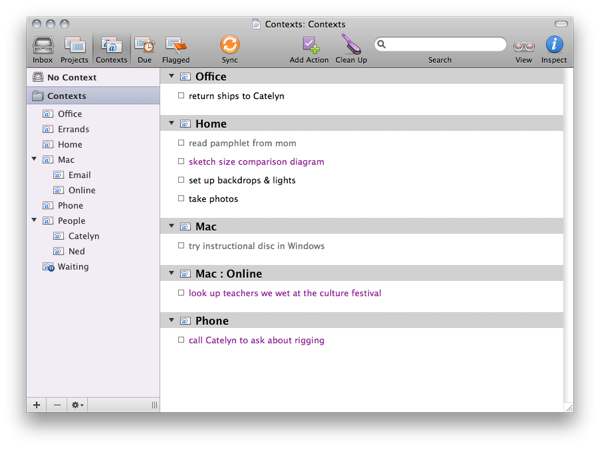
This is what it looks like on OS X:

NewImage

(I would have posted one of my own but it’s got some confidential info in it)

Some to-do list apps are ridiculously simple (like Clear), in that you just put things into it and then they’re in there until you cross them off your list. However, if your list is full of things you can’t or don’t need to be worried about right now, it’s that much more useless to you because it’s cluttered.

With OmniFocus, you’re expected to use a GTD-style workflow.  If you just need to capture a to-do item, put it into your inbox for quick entry. Later, you will go back to your inbox and review the items in it, set up due dates as appropriate and optionally assign a context and/or project to the task. You may have a context for the office, perhaps one for home, perhaps even one for the phone if you have phone calls. The idea here is that if you’re at home you don’t need to be focusing on tasks that are for at the office. I also have a shopping context that I keep a rudimentary shopping list in.

Projects are used to take big things you want to accomplish and break them up into actionable chunks. You can have projects that are one thing you do (get in shape, or maybe build that new product) and then you’re done with it, or you can have projects that are just a bucket of single ad-hoc tasks that are related in some way (or maybe they’re not, like the default Miscellaneous project). I have a good mix of both. 

At first it can (and will) be a little bit nerve-racking to know that you put a to-do item into OmniFocus and not see it in the view you happen to be in. If something doesn’t need to be on your radar until 3 weeks from now, set the start date for then and OmniFocus will hide it from you and sure enough, three weeks later it will appear, just when you need it. For some having that item hidden from view is nauseating (and for me it was a bit unnerving as well), but I strongly recommend that you learn to trust OmniFocus. 

And one of my favorite things about OmniFocus is the fact that you can clip things into it. My favorite thing to clip into OmniFocus are emails. Just install the Mail Clip-O-Tron 3000 into Mail and you can select any message and press ⌘⏎ to bring it into OmniFocus (or whatever other keyboard shortcut you use, I don’t judge). This creates a task in OmniFocus that contains a link back to the original message. An important tenet of the GTD principle is that your contextual information is right there available alongside the tasks at hand. Since I use GitHub issues for issue/bug tracking at work, I also have a handy bookmarklet installed in Chrome which also handily embeds a link back to the page I clipped a task from.

Having a task management system reduces my stress levels because I know that all my tasks are accounted for. Having a good task management system means that I have one that I spend very little time in. I throw information in, then I check back occasionally to organize it into the right contexts and projects, and then I find the next thing I need to do, do it, then I check it off. I’m more productive because I don’t have to spend my time wondering if there are things I’m forgetting. I’m not forgetting anything; the only thing I truly am forgetting is the thing I forgot to capture into OmniFocus; as long as I do that, I’m safe. Having OmniFocus doesn’t necessarily add time to my day, but it makes me accountable for all the things I do have to do. And in line with my paperless style, no matter what device I’m using I can fire up OmniFocus and have all my tasks at hand, so I’m never without my to-do list.

OmniFocus is available for OS X and iOS (both iPhone and iPad versions are available). The apps are quite pricey ($79.99, $19.99 and $39.99 respectively) but these are not your standard shitty little cereal box apps. I don’t want to pick favorites here or anything, but Omni Group makes probably the best apps for the Mac platform, and they’re doing quite well on iOS as well.
Apr 13 2012

The Instapaper Circlejerk

A lot of the people I follow and respect in the Apple tech circles (Gruber, Dan Benjamin, Siracusa, Matt Gemmell, etc.) are very much enamored with the Instapaper app (an application which allows you to save articles for reading later in an app that beautifully cleans up these articles for reading). Instapaper is always getting referenced as an app that’s doing things right, and its developer, Marco Arment, is held in very high regard in these circles. I’ve become entirely convinced he’s getting far too much credit.

First things first: Instapaper is my current “read later” service of choice and I am enjoying it quite a bit. I also have great admiration for Marco’s simple business model and the fact that he can make a living off of doing this whole service by himself (I may be a bit jealous in that regard…). But people are jumping through hoops to compliment Marco’s app, sometimes at the cost of truth, and sometimes through hypocrisy as well.

First off, Instapaper is often (incorrectly) credited with being the “original” read later service. However, that title goes to Read It Later, though apparently just by a couple months.

More recently, Instapaper has been seen as the “good guy” in a recent spew of hate toward Readability after they released their iOS application (and it ended up functioning an awful lot like Instapaper). For the most part it seems people weren’t upset that Readability was copying Instapaper’s schtick (good thing, too, because Read It Later would also be crying foul), but they were upset at Readability’s business model, in which subscribers paid Readability to make articles around the web more readable, and content publishers could register with Readability to collect a portion of those subscriber fees. The fact that Readability collected money on publishers’ behalf without actually necessarily having a business relationship with them irked readers, many of which pointed to good old Marco as the angel child who would never do that. Marco never would try doing something like try to wedge his way in the middle between the reader and publisher, would he?

Well, actually… Instapaper kind of did just that. Last year they had announced a partnership with Readability (it’s since ended) in which you could use Instapaper to queue up your articles and also subscribe to Readability. This was hardly controversial at the time, and I have always found Readability’s idea to be a great step forward in helping both monetize web content that I’m not paying for while still letting me consume it in the way I want to (since publishers can’t seem to produce their content in a palatable form on the web on their own). But because the hivemind hates Readability, this subscription functionality is bad for publishers, yet Instapaper, which doesn’t ever give money to publishers even if they wanted to be paid, is completely innocent (Siracusa justified this in a recent Hypercritical episode by explaining that when you used the Instapaper bookmarklet, you’ve loaded the web page and all its ads so that makes it okay).

But my qualms with Instapaper aren’t related to Readability at all, really. They’re more related to Instapaper as its own product. When I hear people talking about the level of polish and attention to detail that Instapaper exhibits as an app, I have come to expect quite a snazzy application. I mean, Marco doesn’t brag about his attention to detail or anything, but did you know that his app asks for permission to use your location so that it knows when sunsets take place in your neck of the woods to it knows when to darken its pages?

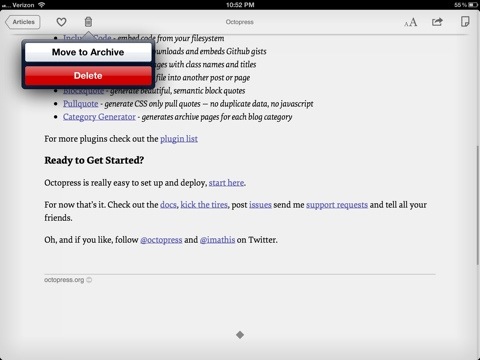
With all the blog posts Marco makes about the painstaking attention to detail he puts into Instapaper, I would expect the reading flow to be natural and require almost no effort. I opened up Instapaper, tapped on an article in the grid view that suited my interests, and set off to read the article. It was beautiful, indeed, but when I was finished with the article, I hit the trash button to get rid of it/archive it, and got this:

20120413-231656.jpg

Odd that it gives you a choice, I thought. Must be a place in settings where you can choose the behavior you want that button to have. Nope.

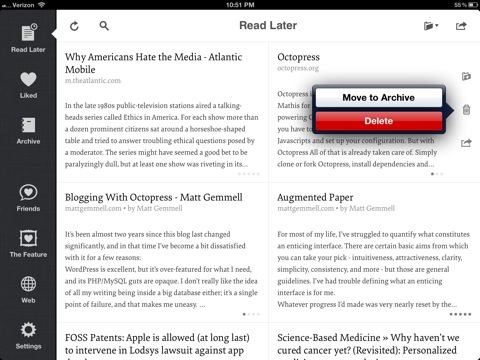
Oh, then. Maybe that’s a secondary way to archive articles, and there’s a quicker way to do it from the grid view. Let’s try that. I went to the grid view and swiped that article to the right and hit the trash icon.

20120413-231839.jpg

Wow. So basically what Marco’s getting at is that he thought this UI through so much that for every article you read and finish (which I assume will be all of the ones you add), the process to get rid of it always requires at least two taps, or a swipe and two taps?

That’s fucking brilliant, Marco.

Now, initially I encountered this button on my iPhone and assumed that it behaved that way because of screen real estate constraints. That’s a reasonable compromise to make. But I would have expected it to behave differently on the iPad where there’s plenty of space for dedicated archive and delete buttons.

This sounds like a hypercritical nitpick, and it would be, if not for the fact that this is an action you will have to perform on every article you ever read in Instapaper. Never make a user take two steps to do what can just as easily be done in one. That’s a cardinal rule.

Okay, Aaron, so it’s one measly little thing that got overlooked. Big deal. Surely there aren’t any other complaints you have, are there?

Up until recently, I would have had the complaint that Instapaper doesn’t parse multi-page articles. I emailed/tweeted Marco about that last year thinking that he’s this baller Mac developer guy who is so thoughtful about user experience that he’d respond, but he never did. And I discovered pretty quickly that Instapaper is pretty useless if it only beautifies the first of a multi-page article, and that’s why I left Instapaper for Read it Later last summer, and I only returned to Instapaper recently after it added the ability to parse multi-page articles automatically.

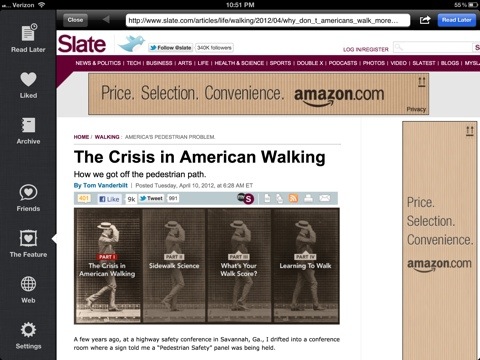
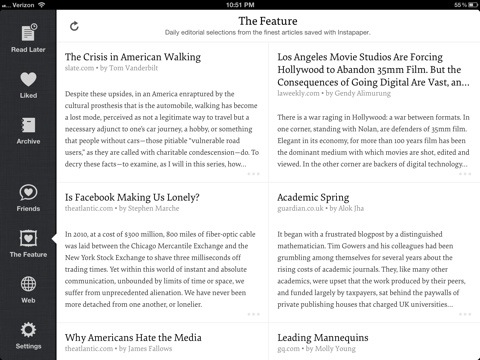
But here’s my favorite quirk of the app. Go to the “The Feature” part of the app, which gives a cool grid view of some of the most popular Instapaper articles.

20120413-232605.jpg

Cool, look at that grid that looks just like my Reading List. Let me open one of these articles and see it in beautified Instapaper view, okay?

20120413-232734.jpg

What the actual fuck? It dumps me into a fucking WebView of the original article? (must be because Marco’s so damn ethical and doesn’t want to cheat the publisher out of that undoubtedly valuable ad impression that you don’t end up looking at)

So, basically, the flow if you would like to read (and then archive) an article from the featured list of articles is thus:

  1. Go to Featured list
  2. Tap on article that interests you
  3. Tap “Read Later” button to add it to your queue
  4. Go to your Read Later section and then tap the article
  5. Wait for article to download/parse, then read it in beautiful view
  6. Tap trash can icon
  7. Delete or archive it

Maybe if Marco wasn’t so busy writing blog posts about how much he thinks through every little aspect of his app, it’d have occurred to him that this flow is absolutely schizophrenic.

I’d be less bitter about these aspects of the app sucking if it weren’t for Marco’s arrogance. He jumps all over other developers and their poor user experiences, but in every instance when I’ve called him on it via Twitter, it goes un-responded to. This lack of response isn’t because he’s not a replying kind of Twitter guy, though. If you tweet something that feeds into his ego, he’s quick to retweet.

The thing that boggles me, though, is that others aren’t also calling Instapaper on these garish mistakes. I mean, if I were going on some tirade about how Instapaper sucks because it doesn’t magically read all articles to me in Morgan Freeman’s voice it would be one thing for me to be the lone critic. And although this post is not without its snark in nitpicking Instapaper, I wasn’t being a troll in my tweets to Instapaper, but I can’t help but feel a little bit snubbed when questions just go ignored on a Twitter account. It’s not my job as a customer to wonder whether your business actively monitors its Twitter account for @replies. Plus, I’ve sent emails that likewise went unanswered.

Compared to Read it Later, I am really failing to see ways that Instapaper really differentiates itself. The tiny details it sweats over are lost in the face of more glaring oversights. Anyone have any insights on this?


Apr 1 2012

https://icanthascheezburger.com/toronto-online-casino-no-deposit-bonus/

If you started using Evernote, it probably didn’t take long for you to feel like Evernote’s starting to cramp your style. You can only be so creative if your tools are basically what you can make with a rich text editor.  To make matters worse, Evernote has remarkably little interest in adding new, more flexible tools to what you can do with the note editor.

But it’s hard to fault Evernote for that. If you wanted to add a single new feature to the note editor as Evernote, you’d have to figure out how to represent it in Evernote’s HTML-like format. You’d have to develop tools in the native Evernote apps (which there are quite a few of), and every time you launch this new tool on one of the platforms, some asshole (usually I’m this asshole) is tweeting you saying how worthless you are that you haven’t brought feature parity to all your platforms.

So with that challenge in mind, don’t expect much from Evernote on this front. But if you find yourself wanting Evernote to have diagramming, advanced drawing, or outlining tools, you might need to approach what Evernote is to you with a new perspective.

Evernote is rigid in what you can edit in its native editor, but beyond that, it’s incredibly flexible. You can attach files of any type to your Evernote notes (even free users can do this now). If you want them to be searchable from Evernote, send a PDF of the file to Evernote and you’re golden.  This gives you the best feature of Evernote: the universal accessibility of a variety of document types.

Don’t sit here waiting for Evernote to get a set of tools as good as OmniGraffle’s, or OmniOutliner’s.  Evernote can’t and shouldn’t try to emulate these apps.  Save your files as PDFs an apps, then send those PDFs to Evernote.  In iOS, Evernote is registered as an app that can open PDFs so you’re golden. And bug your app developers to add support for sending to Evernote (it isn’t that hard).  Ideally I’d like to see some notetaking apps (like Taposé) gain true Evernote integration in which I natively was touching Evernote notes when I was taking notes in the app, but that’s quite an undertaking (though it didn’t stop HTC from making such an app for one of their tablets).

To quote Merlin Mann, don’t fault your hammer for not being a ham sandwich.