Jan 25 2022

Modern Retro Gaming

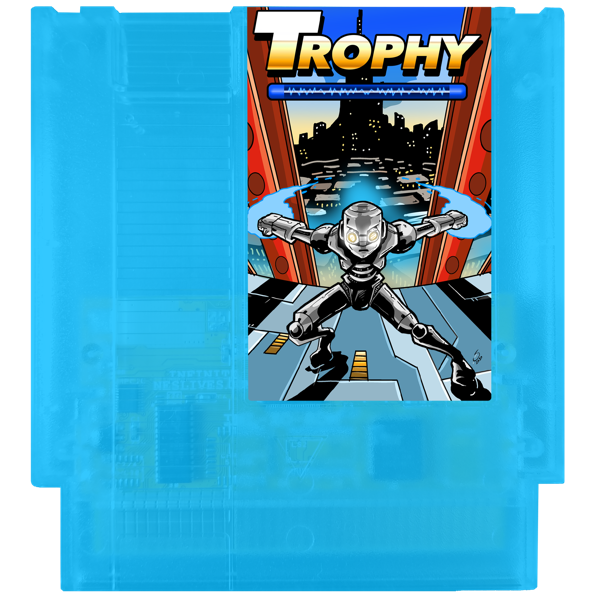
the Trophy NES cartridge. Credit to 6502 Collective
During the pandemic, I got a package from a Kickstarter I backed. It was a new video game made by an indie artist called Trophy. I held onto it, waiting to unbox it until after vaccines were widely available and I could go play it with a friend of mine.

The twist? This was a cartridge for the NES, Nintendo’s console that peaked in popularity in the late 80s.

This isn’t a review of Trophy, but it was an absolute delight to play. It was clearly designed by someone who loved the original Mega Man games, and retains similar mechanics and style. Levels are beautifully designed, each with distinct color palettes, and the game soundtrack is lovely.

It’s not uncommon for modern video games to take on a retro or 8-bit style in their graphics for nostalgia, but there are developers who are willing to take it a step further by actually going to build games for the classic hardware.

And there’s just something really cool about brand new games being released for 30+ year old systems.

For one thing, the games tend to be excellent. Systems like the NES are well-understood inside and out now, and developers can build games now that can eek every last bit of performance out of the console. Not only that, but with improved tooling, some solid games can be built with just a single developer (to make this same game in the ’80s would probably have required an order of magnitude more people). David Murray has been particularly prolific in this space, making games targeting Commodore, Apple and DOS systems. His latest game, PETSCII Robots, has wide compatibility and is probably one of the most sophisticated games out there for more primitive systems like the VIC–20 and the PET.

But the thing I love most about games like these is their almost subversive nature. These developers aren’t aiming to make millions of dollars selling these games; that’s nearly impossible given how few of these vintage computers are in use today. The games are here as a labor of love. And thanks to the limitations of the systems, these games are free of the douchebaggery common with modern games, like loot boxes and gambling-like mechanics meant to get you coming back every day to play the game. These games are simple, and their lack of sophisticated graphics demands that the focus be put into good game mechanics.

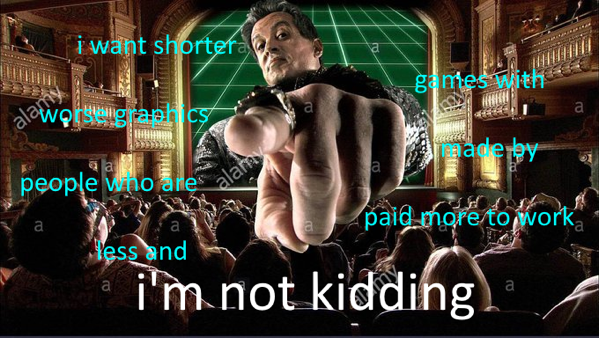
There’s something I find deeply refreshing about that, and I’m happy to support the makers of these games. @moshboy put it best:

I want shorter games with worse graphics made by people who are paid more to work less and i'm not kidding


Jan 24 2022

SwiftScript

This is longer than a tweet would be so instead of making a Twitter thread that’s super annoying that you have to scroll through, I’ll make an actual blog post like a gentleman.

I have a free idea for Apple: SwiftScript.

It’s the successor to AppleScript. It doesn’t replace Shortcuts, but it’s what you graduate to after you outgrow Shortcuts.

the basics

(note: I’m describing this in present tense like it exist, but it doesn’t. I’m sorry, I don’t mean to get you all excited over nothing; it’s just easier to describe it that way instead of constantly with qualifiers)

It’s an actual programming language. It can look Swift-like. Hell, it could even be Swift. I’m not really digging into details here; I just want to do broad strokes.

AppleScript is an actual programming language too, but SwiftScript drops the cutesy English-like syntax which always sounded great on paper but is a nightmare in practice. Instead, we make SwiftScript really easy and approachable by making everything super discoverable.

Unlike the AppleScript editor which is basically just an empty editor you type text into and click “Run,” hoping for the best, SwiftScript is always meant to be interacted with by offering a REPL. You are constantly expected to dig around with this REPL and figure out what’s what in the language and in the apps you want to automate. Everything you type is very much autocompleted, and things are strongly typed so that the SwiftScript environment can always tell you what a thing is, and what you can do with that thing.

You know how web browsers have inspectors that let you click on any element in a page and see it in the DOM? The SwiftScript inspector can let you do the same, except with all the applications on your device. You can look at the Mail app and click a message in the message list and it’ll tell you about the Message entity, what fields a message has, and what methods you can call on the message. Clicking on the Search box will show you related objects, like an object to construct a search for messages. No guessing at what something is called or poring through docs you don’t quite understand. You see something you want to automate, and SwiftScript will show you what you’re dealing with.

Now, for this to be useful, we have to make apps that have very rich SwiftScript libraries for the scripts to use.

What I mean here is that when an app supports SwiftScript, every single entity in the app exposes a SwiftScript API. Shortcuts has been a cool thing to see in iOS (and now the Mac) but far too often I find myself wanting to automate something only to find that it just can’t be done because there isn’t anything close to resembling an action for it. SwiftScript won’t be limited like that; as a programmer you’ll be able to programmatically do virtually anything you can manually do as a user.

going past just a scripting language

So far, the SwiftScript I’ve described is fundamentally a nicer AppleScript, mostly predicated on the idea that you invoke a script, and then run it.

But SwiftScript can do more. SwiftScript apps can offer hooks throughout the app where SwiftScript scripts you write can act automatically when those hooks happen.

For instance, Mail might offer a hook for a new message coming into the Resumes folder (a folder which gets populated by a filter, perhaps). You might then make a SwiftScript that watches for this event, and then whenever a message of this sort comes in, it searches the message for the resume attachment, saves that file to a designated folder, then creates a to-do item in OmniFocus directing you to review that resume complete with the name of the applicant (from the From field), a link to the file itself, and a link back to the original Mail message.

Then, you might add another script that watches for replies to messages, and if you’re replying to a message in the Resumes folder, and then it will present you with a small GUI that asks you whether you are moving forward with that applicant or not, and based on that response, fills out a message for you with the appropriate details supplied from a template, with fields that you can fill in with the right added information. If we want to get really elaborate, maybe when you email a candidate you want to interview, the email might even include a few options for interview times in the coming days based on your availability in the time you blocked off in the afternoons for interviews.

But SwiftScript goes beyond just the applications’ APIs and the hooks they can provide. SwiftScript also is a powerful general-purpose programing language in its own right, with access to super powerful libraries. So not only can you perform repetitive tasks, the kinds of tasks you can let the computer perform can get increasingly sophisticated.

For instance, you might make a script that fires when you favorite a tweet in Twitter, and then the script will save that tweet’s contents to a database. A lot of tweets’ contents are just an image of text, so your SwiftScript can check to see if the tweet includes images, and if it does, check the image to see if it’s text, and if so, OCR the image and save that text into the database so that it’s easily searchable later.

You could even watch that text for certain key words and then tag that tweet in your database if appropriate.

apple: please take this idea and run with it!

The thing that’s just beautiful about SwiftScript here is that it turns any user into an application developer. But you don’t have to know how to develop a full application yourself; you really just get the power of all the apps you already have, but SwiftScript is there to help you fill in the gaps.

It’s clear that Apple looked at its automation story and saw that although AppleScript is quite powerful and continues to have a cult following (think of how amazing it is that AppleScript actually made the jump from classic MacOS to OS X and it’s still around and even works with Shortcuts), they saw a product that’s too complex, and decided that the future of automation on Apple platforms had to be not just made easier to user, but watered down.

I’m so glad that Shortcuts is a thing, and I’m glad that it’s energizing people about automation on their Macs and iOS devices. But it’s less capable than AppleScript.

SwiftScript tries to fundamentally change what automation means to you as a user. It’s an advanced tool because it’s a programming language but it’s making programming highly approachable by being an exploratory language that you are meant to tinker with at runtime as you build your scripts. It’s still for that sophisticated user, but it has the potential to give that user massive leverage by putting programming-shaped handles on every aspect of their computer. I’d love to live in the alternate universe where Apple built this.

But I guess building a car is cool too.


Jan 23 2022

The Moonlander Zip Kit – a Mini-Review

The Zip Kit is one of those oddly specific products a company makes where you see it for the first time and you think “wow, they must have made this specifically for me, and me alone.”

When I first got my Moonlander keyboard, one of the first things I did was rip out the top row of key caps and switches that formed the number row. I was coming from a Planck keyboard and the extra row made the keyboard a little bit too crowded for me. Shortly after, I found I needed to cover the empty holes with masking tape to keep myself from being blinded by the LED pattern. I thought to myself how it’d be really handy to design and 3D print myself some covers for these that snap right into the holes in the plate, but laziness (and a lack of a 3D printer, or the know-how to design such a thing) got the better of me.

Fast forward to a couple weeks ago, and ZSA announced an array of accessories for customizing the Moonlander called the Zip Kit.

It includes a whopping 42 covers, 18 additional keycaps with specific symbols, and two wing stubs.

I had most recently been using my Moonlander with the wings and the number row back in place (thanks to some typewriter-style keycaps that made it easy for my fingers to not accidentally reach for the top row; more in my Moonlander retrospective), but this presented a really cool opportunity to use my Moonlander in the way that I really think of it: like a split Planck that has some extra accessory keys on the outer reaches.

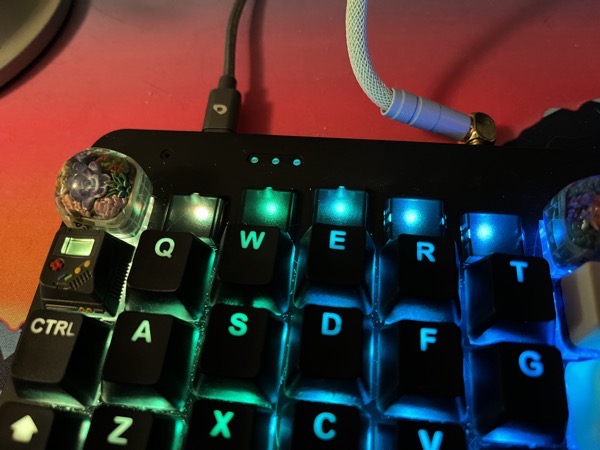
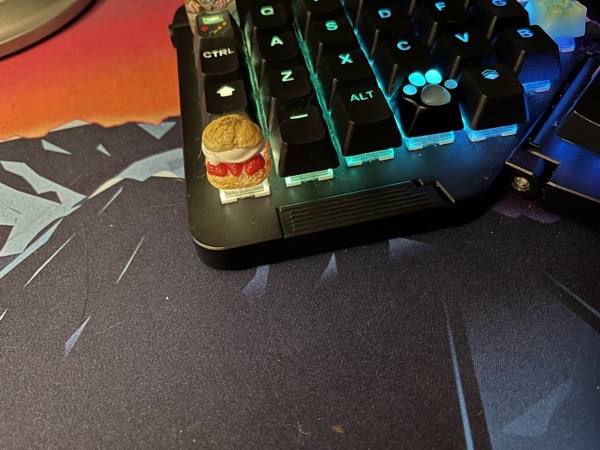
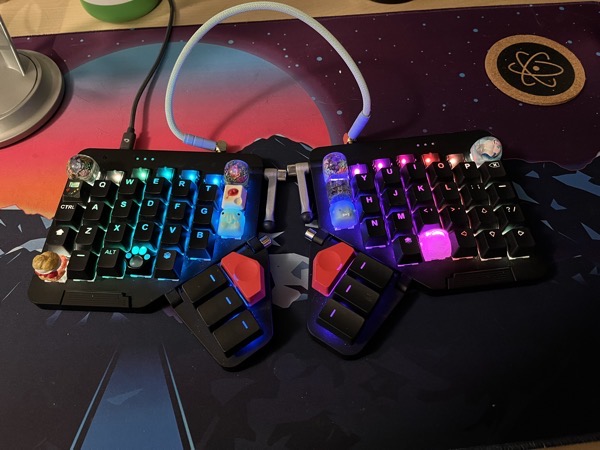
And here’s how it looks now:

the Moonlander keyboard with Zip Kit components installed

a close up of the placeholder caps intalled

The wing stub

another shot of the capped keys from behind

I really like ZSA’s vision for the Moonlander as a highly modular keyboard. Too many keys? No problem, you can remove the ones you don’t need. Is your thumb too strong and you keep accidentally hitting a particular key? Take its switch out and replace it with a stiffer switch. Key caps not to your liking? No worries; the keyboard uses MX-style switches, meaning you have an entire world of custom keycaps available to you. Want to tent it? Want to use inverse tilt? Want to use tripod-style mounting gear? All perfectly valid options.

And not only is the keyboard modular in hardware, it’s just as flexible in software, because its firmware is fully programmable. The keyboard can have whatever layout you want it to have, and it can do things regular keyboards just can’t do, like have keys that do one thing when you tap them, and do another thing when you hold them.

Moonlanders ship with a stock default keyboard layout, but I would actually be surprised if more than, say, 10% of Moonlander owners were using theirs with a completely unmodified configuration. And that’s absolutely fine! This is a keyboard that radically wants to be made yours. It’s not just being offered in a couple different colors to pay lip service to choice; every Moonlander is just for its owner. And that’s beautiful and refreshing.

And the best part here is that all the customizations on offer are fully supported by ZSA and won’t void your warranty. It’s perfect for pro users who need to demand a lot of their tools, but don’t want to futz around with a soldering iron. And as your needs change and evolve, the Moonlander is ready to grow and change with you.

I’m hoping to see some more evolution on the firmware front over time. For instance, these caps are translucent which is beautiful, but it also means my keyboard now has 10 extra RGB LED lights. I’d love to be able to use those lights as arbitrary status lights that my computer can control by sending signals to the keyboard.

It’s also exciting to see ZSA keep new accessories that make my Moonlander better. I can’t wait to see what ideas they come up with next.


Jan 9 2022

“This is a day I’ve been looking forward to for two and a half years”

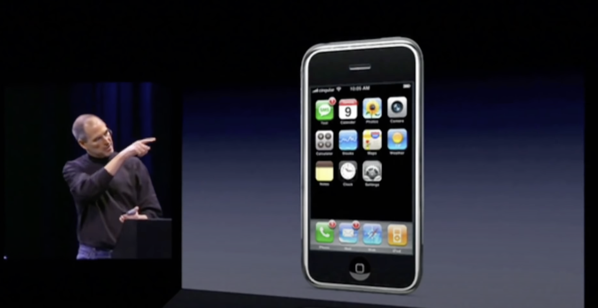
steve jobs unveiling the iPhone in January of 2007
Fifteen years ago to this day, Steve Jobs unveiled iPhone to the world.

I’ve watched this https://icanthascheezburger.com/online-casino-247/ a number of times on YouTube, and every time I watch it I’m taken right back to that cold January day in 2007 when I sat in my dorm room watching the event.

But this is the funny thing about the brain: I wasn’t watching the event live; Apple online casino real money no deposit free chip it; instead I was just madly refreshing a text page as I read text updates that bloggers lucky enough to be at the event were madly typing into their computers in real time. It would be a couple years still before Apple finally started live streaming all of their events.

Fifteen years is quite a long time. When Steve Jobs gave that keynote, macOS was called Mac OS X (the name was https://icanthascheezburger.com/venmo-casino-real-money-no-deposit-bonus/ to OS X in 2012), and the current version of the time was 10.4, an OS so old that when it was first released, Macs were still only running on PowerPC processors.

This sounds kind of bullshitty, but the iPhone changed my life. It didn’t merely become a new category of device I would eventually own (though I lived in Iowa at the time so I was rocking the iPod Touch life for awhile), but the existence of iPhone changed the trajectory of my career.

So far I’ve never really directly worked on iOS apps as a developer, but the mobile revolution that iPhone kicked off spawned a massive new tech economy in the late ’00s and 2010s. I benefited immensely from this, and after watching cool tech startups wistfully from the Midwest I decided to leave my stable-looking healthcare IT job and cram what I could into my car and move to Santa Monica, sight unseen, to work for this serial entrepreneur I had only really talked to once in a Skype call.

In retrospect that decision was probably the most consequential of my career.

In the 15 years since iPhone was unveiled, the world changed to become centered around mobile phones. Online services went from being a thing nerdy people used to being truly adopted by the masses as they became centered around smartphones that everybody now owned. For so many people, their phone is their personal computer now.

And that revolution happened because of (and only because of) the iPhone. Smartphones were a thing before iPhone, of course, but they were BlackBerry-type devices. Android was kind of under development when iPhone was unveiled, but if you look at Android prototypes before and after the iPhone, the influence is really obvious.

The iPhone was the catalyst that made software an even more important part of all of our lives (and given how pervasive it was before the iPhone, that’s saying something). It allowed me to graduate from college in a time of a shit economy and develop a career so lucrative that I regard emails from recruiters with six-figure job opportunities (real opportunities, too!) as almost spammy because I get so many of them.

It blows my mind that I can describe the influence this device has had on my life without describing so much as a single feature of it.


Jan 9 2022

Monetizing the Web Beyond Ads

Reading articles on the web nowadays is an absolute fucking mess. When I try to read news articles on the web without an ad blocker, I’m honestly not sure whether that publisher even wants me to be able to read anything. Heaven help you if you’re on your mobile phone; your entire screen is just going to be covered with things that aren’t the article you’re trying to read.

News orgs and blogs don’t seem all that fond of the situation either. Ad networks aren’t paying worth a crap, so they pack more ads on each page, which probably devalues the page even more. Publishers are looking past advertising to monetize, and more sites than ever are offering subscriptions and putting their content behind paywalls, which pretty much cuts off news sites from casual readers who are reading more than a couple articles a month, but aren’t quite invested enough to pay a sizable monthly payment.

That’s great, except that on a given day, I’ll encounter links to dozens of different sources, and it just isn’t tenable for me to have a $50–100/year subscription to all of them. And even when I do pay, a lot of news sites will still give me ads because they just can’t resist the extra handful of pennies. Even if publishers started offering price points for those casual readers (maybe a sub-$5 subscription that allows for 10–20 articles a month, or a pay-per-article model), it’s still a ton of friction for a reader to sign up for all these subscriptions and manage them and remember to log in every site they have a subscription to, or even just keep mental tabs on which sites they’re subscribed to.

For awhile I used an app called Scroll, which let me pay a monthly fee in exchange for hiding the ads on dozens of web sites. I got to feel good that I could hide ads and support publishers, the publishers could earn more from my clicks compared to when ads were funding them, and Scroll had a nice little business with recurring revenue.

Apparently not enough revenue though, because Scroll sold to Twitter, who kept the service running for a few months, then shut it down and replaced it with a worse version of itself.

I like to think Scroll was showing some traction, though, based on the number of sites they had that worked with Scroll.

Because I’m too lazy to start this company myself, I’d like to lay out the Icanthascheezburger vision for monetizing the web.

For the sake of example, we’ll call it CutTheCrap. I don’t really have any intent of building this product but it’s easier to talk about it like it’s a product that exists.

Introducing (but not really): CutTheCrap

CutTheCrap’s goal is to make it possible to be an independent publisher on the web. In other words, as a reader, I should be able to kick a few bucks to CutTheCrap, and in exchange be able to view just about any article on the web without ads or other bullshit, knowing that every time I view something, the publisher is getting fairly compensated.

Let’s start with price: Scroll’s $5/month isn’t enough; CutTheCrap’s price will be $15 a month.

CutTheCrap’s goal here is to just be a platform; its cut of the revenue will be 20%. CutTheCrap gets $3 of your money every month, and publishers split the other $12.

The way we split this will be unique, though. Streaming platforms like Spotify will divvy up the money in aggregate, meaning that if you’re an indie band and some fans stream your music 80% of the time, overall your streams were only a tiny, tiny percentage of the total, so you get a tiny, tiny percentage of the pie.

CutTheCrap works differently. If half of a user’s visits are to your sites, you get half of that user’s money that month. If a user looks at 100 articles and one is yours, you get 1% of what they spent. If they look at 1000 articles that month and one is yours, you get 0.1% of their money that month. This model is probably subject to getting tweaked as time goes on to allow for more equitable distribution of revenue (more on that below).

And every month, subscribers will get a full and transparent report from CutTheCrap detailing where their money went.

Dividing up $12 between a ton of publishers still looks like a small amount of money to each publisher, but if you look at this in terms of annual revenue and when you add up enough users, it starts to be significant money, and it’s a hell of a lot better than the scraps a publisher makes off your eyeballs in the ad-based economy.

The basic version of CutTheCrap does just that; it cuts the crap out of the web for you. You use it by installing a lightweight extension in your browsers which identifies you anonymously to web sites, and when those web sites see you’re a CutTheCrap user, they give you the first class experience: articles with no ads or trackers and a clean layout. I love this approach because it doesn’t force you to use a new app; it’s just using the open web. And it also means that if you click a link from someone and are taken to a site, CutTheCrap just works like it should; you get the crap-free version of the article you wanted to read.

And the power users among us can pay more each month to get extra features, such as an auto-archival feature that will store a pristine archived copy of every article you’ve read, making it available to search through, clip excerpts from, or export to your own apps like Evernote, Notes or DEVONthink. ANd the most hardcore of users will enjoy full-text RSS feeds.

CutTheCrap at Scale

Initially, CutTheCrap’s goal is to reach a critical mass of users so that they have wide influence. And I’m sure if I were pitching this to a VC, I’d have to frame it like this because nothing gets VCs more aroused than the idea of reaching industry dominance that makes your company a de facto monopoly.

But it’s not cool for a single company to retain that kind of power. Plus, at scale, that would put CutTheCrap in a situation where their 20% cut of revenues is grossing CutTheCrap more money than any individual publisher that uses the platform.

Instead, upon reaching a critical mass of subscribers and publishers, CutTheCrap graduates from being a singleton company to being protocol-based, with CutTheCrap itself sticking around to maintain the protocol itself. That means multiple companies can sprout up to solve this problem. As a user I could subscribe to a different company’s version of CutTheCrap and still get the same ad-free experience on any web site that was built to work with CutTheCrap, and likewise, a publisher wanting to monetize can monetize with any CutTheCrap company. As long as the companies and publishers conform to the protocol, they can monetize.

I’m glazing over a lot of details here, which I feel entitled to do because it’s just a thought exercise, but in reality needs some thought:

  • Is it fair to have a one-size-fits-all approach? What if there’s one site that publishes a couple articles a month, but they’re high production value and expensive to produce, but another site churns out dozens of relatively low-value articles a day? And more urgently, does this model incentivize publishers to do that?
  • I’m taking a very US-centric approach to this, but what happens when we start having countries with a weaker currency participating in this?
  • Not all news orgs are created equal! Different news orgs will have different political biases and editorial standards; CutTheCrap would need to set standards for who can monetize. Once it becomes decentralized and protocol-based, this could become simpler, since each instance of CutTheCrap can set their own standards, and as a subscriber you can pick a CutTheCrap service that best aligns with you.

There are also other places on the web that are becoming very saturated with advertising; in particular, social networks and video streaming services. I’m less worried about these. First off, a lot of these services already offer ways to pay to get rid of ads (Hulu, YouTube and HBO, for instance, all have versions that you can pay to eliminate ads for). Also, because the social networks exert a lot more control over how ads are presented, the ads themselves are a good deal more palatable. There’s still plenty of cause for concern (Facebook is, after all, invasive in how deeply they target people for ads), but it feels like a different category of problem.


This is about more than just some nerd who has a personal vendetta against annoying ads. CutTheCrap is a vision of a possible better future for the web. The stakes are high.

News organizations can’t offer quality journalism to their readers when they are beholden to advertisers or ad networks writing big checks and calling the shots; they need to be beholden to readers who are financially propping them up.

I want this reader support to create newsrooms with deeper pockets so they can go after bigger and more important stories. I want to see new news publishers feel empowered to set up shop and try new things knowing there’s a stream of money that can be tapped into, and I want those new news organizations to push existing news organizations to be better (looking at the New York Times).

People who read the news need and deserve news that they can trust and afford to financially support. Getting someone to spend $10–30 a month on a subscription to a single news site is a tough sell, but I think we could convince a lot of people to kick in $15 a month to know they can lose ads and not feel any guilt about it.

More fundamentally, CutTheCrap expresses a vision of shifting power. Being ad-driven leads directly to being dependent on massive scale, and that leads to consolidation of publishers, and it leads to newsrooms cutting jobs and running too lean to do their jobs right. CutTheCrap creates an environment where publishers are beholden directly to their readers, the only people publishers should be beholden to.

In the absence of that, I run an ad blocker, and I spend a considerable amount of money giving my patronage to a number of different sites. I try to favor giving money to smaller and more niche ones (the New York Times will survive without my money). It’s not perfect; ideally I’d like every article I read to kick money to the publisher if they need the money, but it’s the best balance between protecting myself from a barrage of ads (and often shady tracking code) and ensuring that I’m supporting the open web.
Jan 5 2022

Photos for iOS: Find All Items From a Specific App

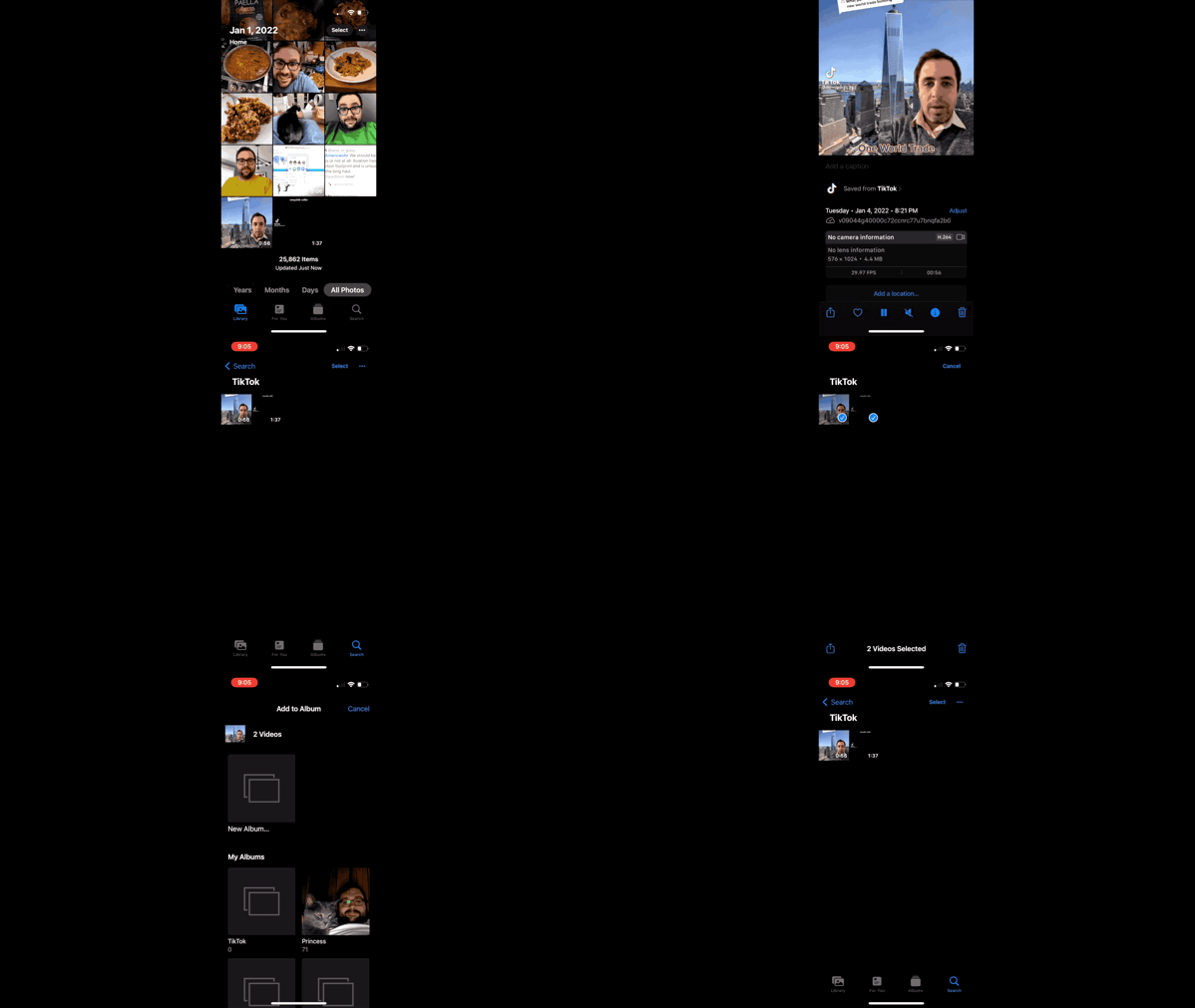
Another little tidbit that I discovered recently: if you are saving a lot of photos or videos to your photo library from a specific app (such as, for instance, TikTok), and you want to collect these images in one place, you can do it pretty easily!

Open one of the photos or videos, then press the Info button. If the item is saved from an app, there will be a button indicating the photo was saved from that app. You can just tap on that, and you’ll then be brought to a search screen that shows images from that app.

I then press Show All, then I will select all the photos and put them into an album.

demonstration of the steps i outline in this post

My life would be simpler if I could just make a smart album based on what app the photo was saved from, but smart albums aren’t able to be created on iOS, and the Mac version of Photos doesn’t seem to keep the metadata about the app a photo was saved from, so for now it has to be done semi-manually.


Jan 4 2022

Photos for Mac: Deleting Items From Within a Playlist

As part of my workflow for archiving downloaded videos from TikTok, I put TikTok videos into a manually created album in the Photos app so that I can drag them in one step into the Finder.

But after I was done, I couldn’t delete the items from my photo library; the option doesn’t exist when I right-clicked the items, and the Delete key only deletes the items from that album.

I searched the web for this, thinking maybe I’d find an iOS shortcut that does the trick. Glenn Fleishman had an article on MacWorld that outlined a way to do it that involved tags and a smart album, but that seemed really convoluted.

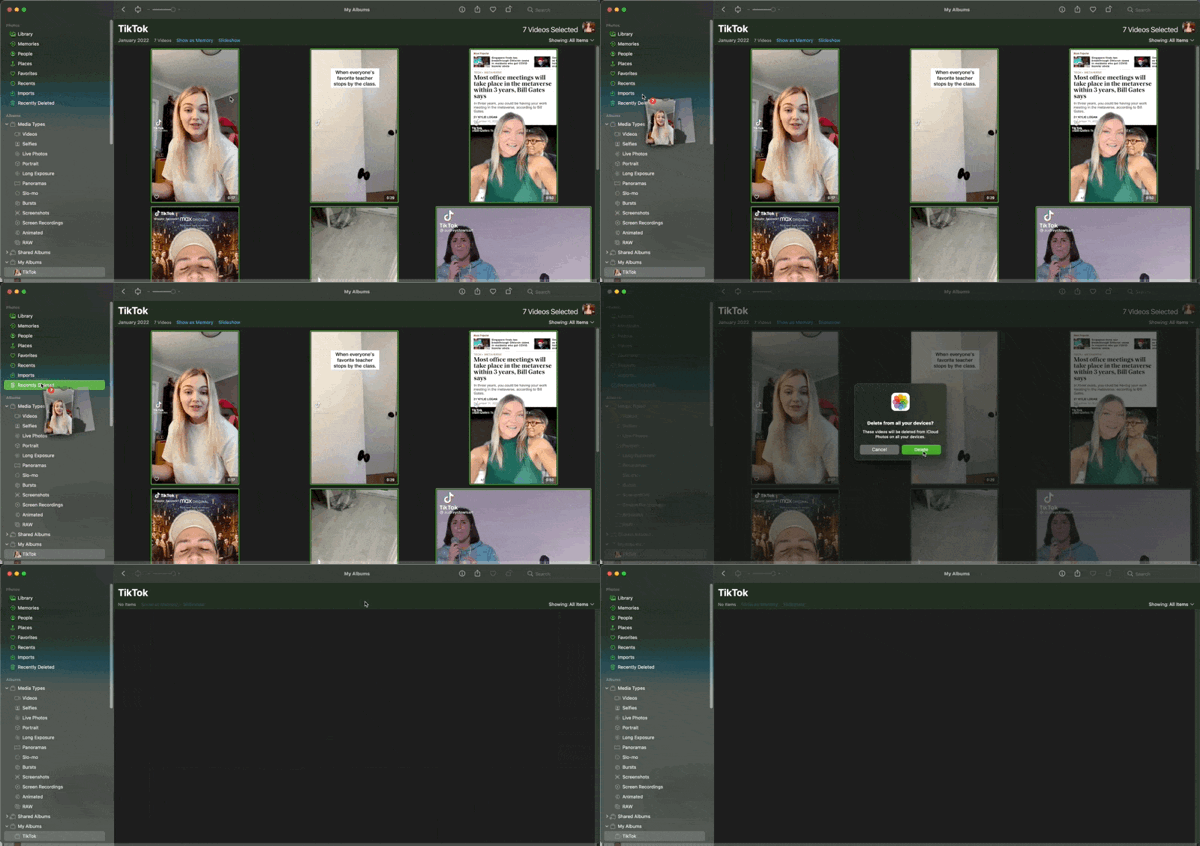
But there’s actually a really simple solution: you drag the items to Recently Deleted.

demonstrating dragging Photos.app items into the Recently Deleted folder

Sometimes the best solutions are the simplest ones.

It wouldn’t kill Apple to add a context menu item for deleting, though.