
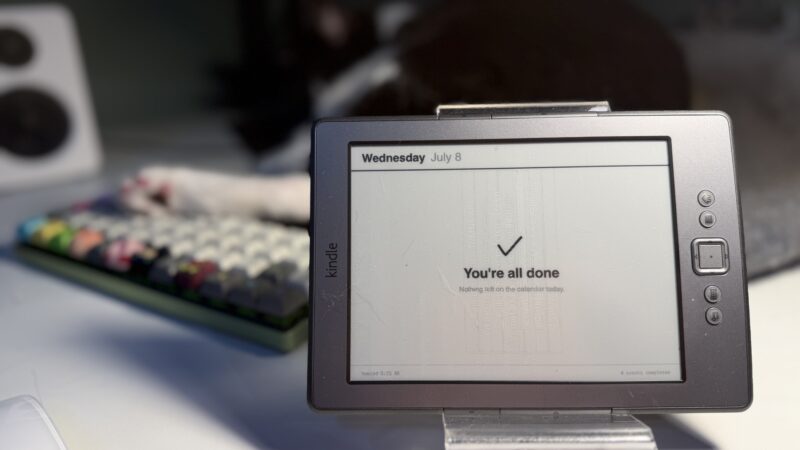
The TRMNL is this cool programmable eInk screen that is connected to Wi-Fi and can display pretty much anything you like (and there are tons of fun things it can display thanks to a big ecosystem of plugins).
As a nerd, that sounds fun. I was even more intrigued when I learned its business model is pretty neat too. No subscriptions, a very open API, and basically all the components are open-source.
I’ve had my eye on blowing some money on one until last summer when their CEO started running his mouth on Twitter with a bunch of anti-LGBT bullshit.
Earlier this year Amazon decided that they were going to drop support for a bunch of older Kindles. I figured that would be a great opportunity to save an old Kindle from being e-waste by turning it into a makeshift TRMNL.
First, a disclaimer: Even though I’m not giving TRMNL any money, I am still using their open-source software for this project. I’m using their client for the Kindle, and I’m using their Terminus open-source server. In that sense, I’m still supporting TRMNL by using (and also talking about) their stuff. For me, it felt like an okay balance to use it without financially supporting them. If that’s getting too chummy with TRMNL for your taste, I’ll explain alternatives below.
The pieces
When you buy an off-the-shelf TRMNL, it’s a complete product and you can just follow the happy path because it’s a TRMNL device running TRMNL firmware, talking to TRMNL’s cloud, and you configure it using TRMNL’s web app.
However, TRMNL’s target audience are nerds and they allow you to DIY some or all of this process. You can, for instance, choose not to use TRMNL’s servers and point your device at your own server (this is called BYOS, or Bring Your Own Server). Or, you can bring your own non-TRMNL device (this is called BYOD). You can do both! And each step along the way you can choose to use software made by TRMNL or someone else in the community.
Let me run you through the components I’m using:
- A Kindle 4th generation, jailbroken so that I can install other software on it
- KUAL, an application launcher for jailbroken Kindles. The jailbroken Kindle still boots into a standard Kindle library interface, so you first open KUAL.
- KOReader, an alternative e-reader app that runs on a jailbroken Kindle
- TRMNL plugin for KOReader, which basically polls a server periodically and displays a PNG that the server sends back to it.
- Terminus server, TRMNL’s open-source implementation of a server that powers TRMNL devices
- AGNDA, a TRMNL plugin I custom made that leverages a separate Python server that connects to my Google Calendars and grabs calendar data for display
Jailbreaking the Kindle
This was the biggest fucking pain in the ass because I waited until after Amazon dropped support to do the jailbreak. Most modern Kindle jailbreaks involve a hack to the Kindle Store app, but because mine won’t even talk to the store in the first place, that approach was dead in the water. If you take the unsupported Kindle route, do it because it was dirt cheap.
After trying a bunch of alternatives, I found a really detailed Reddit post outlining how to do this. Yes, you literally have to update firmware versions one at a time to get it up to the version where it will handle the jailbreak. I also remember getting stuck at one point where it was booting into a separate UI but the jailbreak wasn’t finishing installing. I was trying a bunch of stuff and didn’t take notes but eventually I improvised my way into getting the Kindle to the point where it said it was jailbreaking!

After that, I got KOReader installed. For ease, I tried a two week trial of a real TRMNL license to just connect the device straight to that to make sure I had the Kindle configured right.
After this, I discovered that Aliexpress has a clone TRMNL device that cost $10 more than what I paid for this Kindle, which I will probably do next time. But if you have access to cheap Kindles, this works well.
Server setup
Getting the Terminus server set up is more involved than your average setup process. This is more like LEGO pieces you have to assemble than a nice setup wizard that walks you through the process. A few concepts:
- There’s a Device manager, and you’ll want to add a device to represent the Kindle. I had to modify the Kindle’s KOReader plugin to have it send along the devices’ MAC address when it made requests to the server so the server would know it matched up
- Extensions are plugins that render screens. A plugin works by fetching data from some source, and then it renders that data using a template language called Liquid, which is kind of a markup language.
- A screen is a representation of what can show up on a TRMNL’s physical screen at a given time. Screens can be static images too!
- Playlists are what you use to decide what screen(s) will appear on your TRMNL. If you have a small device, you might want to rotate between displaying different things, or have a schedule that determines what time of day certain things are shown.
AGNDA
You get access to community-created plugins right from the Terminus server, but you don’t get access to official ones like their Google Calendar plugin. When I was trying out the official TRMNL servers I tried their version of the Google Calendar plugin and it wasn’t that great.
So I made my own.
My version looks much nicer and it works automatically with calendars from both my work and personal accounts, merging into a single agenda.
Doing this with less TRMNL?
If you want to have less TRMNL in the stack, the easiest thing to swap out would be the server. Terminus is TRMNL’s officially maintained server, but there are several alternative servers including LaraPaper and Inker (both of thse repos are under TRMNL’s GitHub org but appear not to be maintained directly by TRMNL at first glance).
For alternative client software, you might be on your own here. But if you’re already thinking about breaking free from using TRMNL you can build your own custom client and server that doesn’t behave like a TRMNL at all.
Conceptually the device isn’t complicated; it polls a server which responds with a rendered PNG image that goes on screen. The power of using stuff compatible with TRMNL’s ecosystem is, well, the ecosystem. You can benefit from a vast library of community-made extensions right out of the box.
But if you’re cool with coding up something yourself, that’s very achievable! All you have to do is decide what you want to fill an eInk screen with.
As someone who tinkered with Linux and computers as a teenager, I learned pretty quickly that I really value when people with great taste build out proper products that are a joy to use, even when you can DIY it.
Yes, 19 year old me, you can theoretically take an old laptop and install a bunch of random software on it and literally duct tape together a digital picture frame, but you’d have been way better off just buying one off the shelf that’s made for that purpose. I got older and wiser and realized the value in that.
But also as I’ve gotten older and wiser, I’ve realized that buying stuff off the shelf can’t be a solution to absolutely everything. For one thing, the off-the-shelf product might not suit your needs just right and you might be able to do better with something custom.
And more deeply, I don’t like my relationship with the world being that of a pure consumer, just dependent on others to solve my problems. It’s worth the extra struggle sometimes just to know that I can still do a thing the hard way, and feel that much more satisfied in the outcome.
And even more deeply, even if I really admire the product sensibilities TRMNL’s CEO embodies, their CEO running his mouth on Twitter with some homophobic bullshit loses them my financial support. Merely existing in today’s society involves getting pushed into moral tradeoffs constantly, but this was one thing I had control over.
I’m a little late to post (in fairness I had a draft ready in June), but happy Pride. 🏳️🌈🏳️⚧️👬
Leave a Reply